Tempo app icon
For tinkerers, from a Mac to a rack.

Every signal from every source on one Mac-native timeline.
Yours to shape. Ready to act.

One Mac-native timeline for everything your stack does. If it can POST, Tempo can hear it: from rack-side monitoring to Mac-side automations, from third-party services to your own scripts. Every event arrives in context, with the next move one click away. You stay the conductor; Tempo holds the score, and never acts on its own. Local-first, no cloud, no telemetry.

Download Tempo

13 MB · macOS 15+ · Signed & notarized · v1.x freeware

Or via Homebrew: brew install --cask caereforge/tap/tempo

One timeline. Three looks ↓
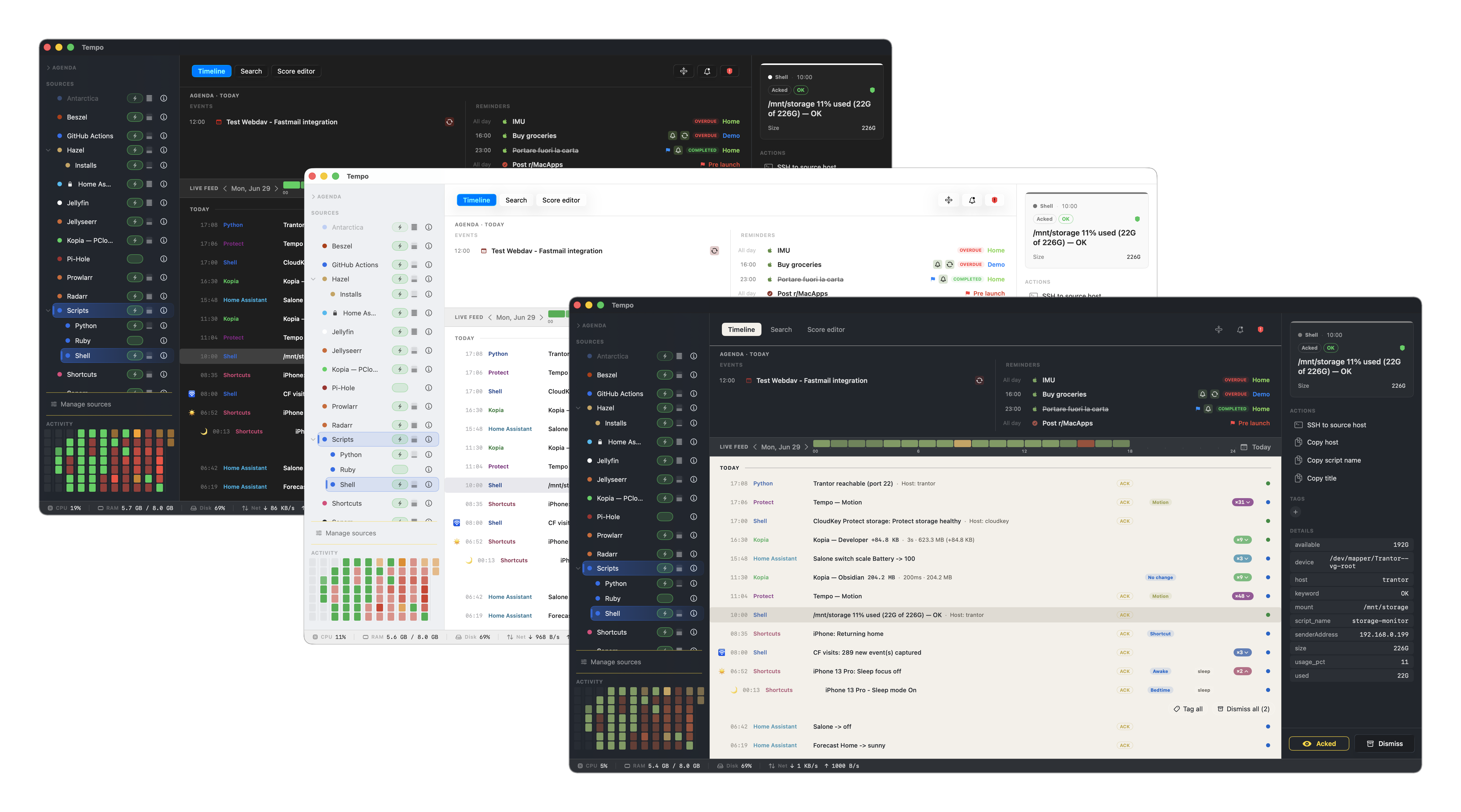
Tempo timeline in three themes
More screenshots →
What Tempo does
Every signal, one feed
Homelab monitoring, backups, deploys, network and file events, Mac-side automations, your own scripts, plus your Mac's own calendar and tasks. One chronological timeline, no dashboard juggling.
Actions, ready to go
SSH to a flagged host, open a HA dashboard, restart a container, ack an incident: every event ships with the buttons you'd reach for.
🔒
Local-first, LAN-reachable
Local SQLite. No account, no cloud, no telemetry. The HTTP ingestion endpoint binds your LAN with per-provider tokens, so your NAS, HA, and monitoring stack post directly.

If it speaks HTTP,
it works with Tempo.

Modules ship for the usual homelab stack. Anything else just POSTs JSON to Tempo's LAN endpoint: Home Assistant automation, n8n flow, bash one-liner with curl, Grafana webhook. No plugin SDK, no rebuild.

Each event carries its own action set, defined in a small score. Build it in the Score Editor, or drop one in / hand-edit the JSON — Tempo reads the fields and builds the buttons. Use payload tokens like ${metadata.host} so each click already knows the context.

// curl from anything on your LAN // → it shows up in the timeline { "title": "web-01 DOWN", "eventType": "alert", "providerIdentifier": "com.uptime-kuma", "metadata": { "host": "web-01", "ip": "10.0.1.42" }, "actions": [ { "label": "SSH", "trigger": "openURL" }, { "label": "Ping", "trigger": "openTerminalWith" } ] }
Works with your tools
Home Assistant
Uptime Kuma
Kopia
UniFi
GitHub Actions
Shortcuts
Pi-hole
Synology
Beszel
Vaultwarden
Jellyfin
Jellyseerr
Sonarr
Radarr
Prowlarr
Hazel
Todoist
Calendar & Reminders
+ any tool with webhooks
Why Tempo exists

I've spent most of my career as a Unix sysadmin, the kind of work where you learn, over time, that the machine doesn't care how pretty your dashboard is. It cares whether you notice the thing that matters, in time.

Eventually I came home from that and kept doing the same thing for myself. A homelab grew. Home Assistant, a UniFi stack, Uptime Kuma, Beszel, my backup tool of choice (Kopia), a couple of always-on services, GitHub Actions for side projects, the schedule that actually runs my life. So many browser tabs to monitor every morning, each speaking its own language, none of them talking to each other.

Dashboards didn't solve it: dashboards ask you to look at them. What I wanted was the Unix instinct expressed through the Mac: the power of the terminal and the craft of native macOS design, in one surface. One timeline, everything that happened, in order, with the right action one click away. Local-first, because the data stays on my machines. LAN-reachable, because the services don't run on the Mac. Never acts on its own, because silent automations are how you lose trust in your own system.

You stay the conductor. Tempo is the score.

Tempo is that tool.

FAQ
Two senses, both intentional. Tempo is the musical term for the pace of a piece, which is what your homelab has, whether you notice it or not: a pulse of events across machines, some steady, some spiking. And a conductor doesn't play the instruments. They give the ensemble a shared sense of time, and they decide when something needs attention. That's the posture Tempo is built around: you stay the conductor. Tempo is the score in front of you.
A native macOS app that receives every signal from your homelab (Home Assistant, Uptime Kuma, Kopia, UniFi, CI/CD, custom scripts…) and brings it onto one chronological timeline, alongside your schedule, if you like. Each event ships with the actions you'd reach for: SSH, dashboard, terminal command, Shortcut. One place to see what's going on across machines. Tempo shows and proposes; it never acts on its own.
HA is great inside its own world. But your homelab isn't only HA: it's also your NAS backups, monitoring stack, GitHub Actions, network gear, and the calendar and tasks on your Mac. Tempo isn't trying to replace any of those dashboards; it sits on top, shows the events that need your attention, and gives you one place to act on them.
Tempo runs an HTTP ingestion server on your Mac — plus an optional HTTPS/TLS listener — reachable from your local network. Each provider gets its own token; every remote ingestion is logged. The endpoint is LAN-only by default and never exposes your data to the internet. Anything that can curl can post to Tempo. Need events from an internet source, like a cloud webhook? Optional helpers can relay them in to Tempo, so it receives remote events without its endpoint ever being exposed online.
If it can send an HTTP request, Tempo can show it. Out of the box there are ready-made scores for the tools homelabbers reach for most — Home Assistant, Uptime Kuma, Kopia, UniFi (Network & Protect), Pi-hole, Beszel, Vaultwarden, GitHub Actions, the *arr stack (Sonarr / Radarr / Prowlarr), Jellyfin, Jellyseerr, Hazel, Apple Shortcuts, Todoist — plus Apple Calendar & Reminders, and a generic webhook for everything else. (Synology and Fastmail CalDAV ship experimental for now.) The list keeps growing, and the community drives much of it: I can't run every tool out there in my own homelab to test it, so scores are just shareable files anyone can write and pass around. Bring what you use.
Yes, this is the core of Tempo. Every event type has its own action set, defined in a small JSON file called a score. The score declares the buttons, what they do (open URL, run terminal command, copy to clipboard, trigger a Shortcut), and the labels. Tempo ships bundled scores for common sources, and you can write your own. Use payload tokens like ${metadata.host}, ${metadata.ip}, ${title}, so each button already knows the context. Edit all of it two ways: visually in the built-in Score Editor — its Actions tab adds and edits the buttons (label, icon, trigger, payload), no JSON needed — or in the score's JSON directly. The same editor also covers severity, tags and emoji.
Those automate server-side workflows. Tempo centralizes visibility and decision on your Mac. It reads your local Mac context (things server-side tools can't touch), puts it alongside infra signals, and lets you decide what to do. They're complementary: Tempo can be the human-facing surface in front of an n8n flow.
No account, no cloud sync, no third-party telemetry. Everything lives in a local SQLite database on your Mac. The HTTP ingestion server is LAN-reachable (so your homelab can post to it) but never exposed to the internet: it accepts only signed requests from per-provider tokens stored in the macOS Keychain. Optional TLS.
Tempo v1.x is freeware, and will stay that way. No trial, no Free/Pro tiers, no subscription, no account required. A future v2 may be a paid one-time purchase; details are in the freeware announcement.
No, distributed as a signed and notarized DMG (Developer ID), with auto-update via Sparkle. Outside the App Store sandbox so the LAN ingestion server, terminal commands, and AppleScript hooks all work without restrictions.
Yes. Tempo reads from Apple Calendar via EventKit, which natively syncs CalDAV accounts: if a calendar shows up in the Apple Calendar app, it shows up in Tempo. And if an account isn't set up in macOS, Tempo also has an experimental native CalDAV provider that connects to the server directly.
Tempo's author and architect is me. Design, architecture, and testing are mine; implementation is AI-assisted. More on how it works in Is Tempo vibe-coded?.