Beszel is a lightweight, self-hosted server-monitoring hub. It watches CPU, memory, disk, temperature, load, and up/down status across your machines and raises an alert when a metric crosses a threshold. This score reads those alerts and renders them on Tempo’s timeline as structured events, one stack per host and metric, so a flapping monitor reads as a single entry instead of a flood.
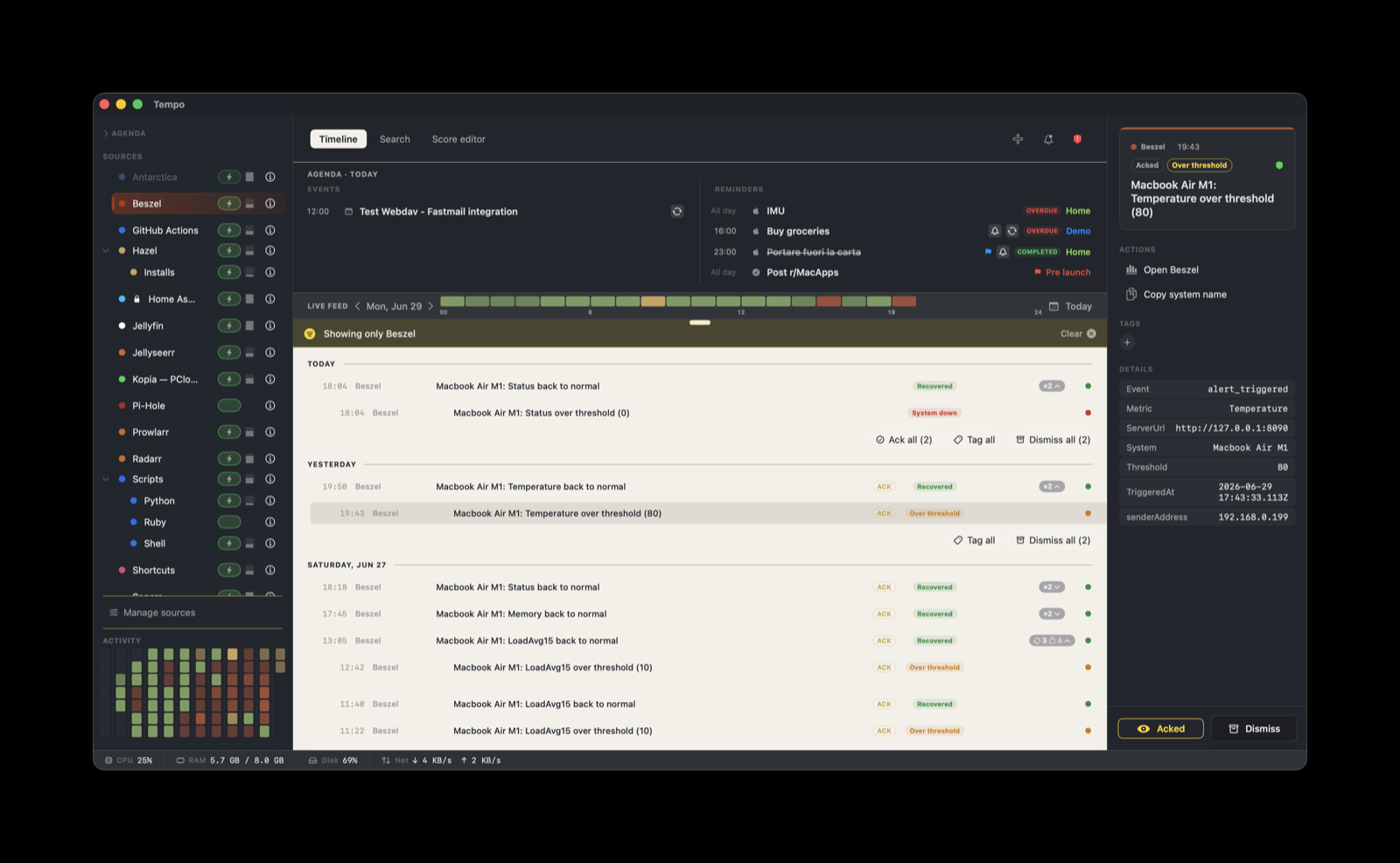
This score is built into Tempo. It ships with the app and is seeded into ~/Library/Application Support/Tempo/Scores/ on first launch, so there is nothing to download for the score itself. The work below is setting up the companion helper once.
How it works
Beszel can already send notifications through Shoutrrr, but its generic:// webhook carries a title and a message string only. Beszel flattens an alert before Shoutrrr sees it, so the metric, the threshold, and the triggered-or-resolved state never reach Tempo. A title alone is not enough to assign severity or to group a flap cycle.
The helper takes a different path. Beszel runs on PocketBase, and PocketBase exposes the structured alerts_history records over its HTTP API. The helper is a small Python poller (beszel-tempo.py) that signs in as a read-only user, reads those records, and posts a full event to Tempo on each alert transition, with the system name, the metric, and the state intact.
Beszel hub (PocketBase on :8090)
      |  HTTP, read-only PocketBase API
beszel-tempo.py  (polls alerts_history, builds a Tempo event)
      |  HTTP, with the per-provider Tempo token
Tempo ingestion server  on <your-mac>:7776
The helper posts only on transitions (an alert triggered, then later resolved). It does not stream the raw telemetry, and it does not post on a heartbeat. The score handles what happens after the event lands: the severity, the grouping, and the action buttons.
Run the helper on a host that can reach the Beszel hub, typically the hub box itself. This guide does not use Beszel’s own notifications. If you had already pointed a Beszel generic:// notification at Tempo before setting up the helper, remove it, so the same alert does not arrive twice.
What you need
- A host that runs Python 3 and can reach the Beszel hub. The hub box itself is the usual choice.
- Access to the Beszel hub’s PocketBase admin UI at
http://<hub>:8090/_/to create a read-only user and grant it read access. - Tempo running, with this score installed.
- A Tempo ingestion token bound to
com.beszel.
1. Create a read-only poller user in Beszel
Beszel is PocketBase, so the poller authenticates as a normal users record. Open the PocketBase admin UI at http://<hub>:8090/_/, sign in as superuser, and create a dedicated user for the poller, for example tempo-poller@your-domain.
The alerts_history and systems collections are owner-scoped and share-scoped, so a fresh user sees nothing by default. As superuser, edit the collection rules so the poller can read every record while staying read-only:
# alerts_history.listRule  (keeps each user's own access, lets the poller read all)
@request.auth.id != "" && (user = @request.auth.id || @request.auth.id = "<POLLER_USER_ID>")

# systems.listRule AND systems.viewRule  (needed to expand system IDs to names)
@request.auth.id != "" && (users.id ?= @request.auth.id || @request.auth.id = "<POLLER_USER_ID>")
Leave the create, update, and delete rules untouched. The poller never writes; a write attempt returns 403. Note the caveat in the troubleshooting section: a Beszel upgrade can reset these rules.
2. Create the Tempo token
In Tempo, open Settings → Ingestion and create a token bound to com.beszel. Copy its value; the helper needs it. Your ingestion endpoint is http://<your-mac-hostname>:7776/ingest.
3. Get the helper
In the Score Editor, select Beszel and open the Source tab. The Helper section has Open in Finder and Open README. Open in Finder copies the helper package to ~/Library/Application Support/Tempo/Integrations/com.beszel/ and reveals it. The package holds the poller script beszel-tempo.py and a copy of its README. Copy beszel-tempo.py to the host that will run it.
4. Configure the helper
Create an environment file next to the script, for example ~/tempo-beszel/beszel.env, readable only by you (chmod 600). Keep the two secrets, the Tempo token and the Beszel password, in their own files rather than inline:
export BESZEL_URL=http://127.0.0.1:8090
export BESZEL_USER=tempo-poller@your-domain
export TEMPO_URL=http://<your-mac-ip>:7776/ingest
export STATE_FILE=/home/<you>/tempo-beszel/beszel-state.json
export POLL_SECONDS=30

# Secrets, read from their own chmod 600 files, not stored in this env file:
export TEMPO_TOKEN_FILE=/home/<you>/tempo-beszel/tempo-token
export BESZEL_PASS_FILE=/home/<you>/tempo-beszel/beszel-pass
The poller resolves each secret from ${VAR}_FILE first, then from a plain ${VAR} environment variable. Pointing at a file keeps the com.beszel token and the Beszel password out of the env file: use any chmod 600 file, a Docker secret on tmpfs, or a systemd-creds credential. If you would rather keep it simple, you can set TEMPO_TOKEN and BESZEL_PASS inline in the env file instead, since it is already chmod 600. The Beszel password is used only against the hub and is never sent to Tempo.
On first run the poller seeds its state silently, so historical alerts already in alerts_history do not flood the timeline. Only new transitions after that produce events.
5. Run the helper as a daemon
The poller is a long-lived process. It should restart on crash and start on boot. A small run wrapper sources the env file and execs the script, logging to a file:
#!/bin/sh
# beszel-run.sh
. /home/<you>/tempo-beszel/beszel.env
exec python3 /home/<you>/tempo-beszel/beszel-tempo.py \
  >> /home/<you>/tempo-beszel/beszel-watcher.log 2>&1
Linux (flock keepalive cron)
The simplest persistence is a flock keepalive cron. It runs a single instance, restarts within five minutes if the process dies, and starts on boot:
*/5 * * * * flock -n /home/<you>/tempo-beszel/beszel.lock /home/<you>/tempo-beszel/beszel-run.sh
@reboot     flock -n /home/<you>/tempo-beszel/beszel.lock /home/<you>/tempo-beszel/beszel-run.sh
Linux (systemd)
If you prefer systemd, create /etc/systemd/system/tempo-beszel.service:
[Unit]
Description=Tempo Beszel poller
After=network-online.target

[Service]
ExecStart=/usr/bin/python3 /home/youruser/tempo-beszel/beszel-tempo.py
EnvironmentFile=/home/youruser/tempo-beszel/beszel.env
Restart=always

[Install]
WantedBy=multi-user.target
Then sudo systemctl enable --now tempo-beszel.
macOS (launchd)
If the host is a Mac, run the wrapper from a LaunchAgent. Create ~/Library/LaunchAgents/app.tempo.beszel.plist with ProgramArguments pointing at beszel-run.sh, RunAtLoad and KeepAlive set to true, then load it:
launchctl bootstrap gui/$(id -u) ~/Library/LaunchAgents/app.tempo.beszel.plist
launchctl list | grep beszel
Windows
The poller is pure Python 3 and runs on Windows. Provide the secrets as environment variables (or *_FILE paths), then keep python beszel-tempo.py alive with a process supervisor: a Scheduled Task that runs at logon and restarts on failure, or a service wrapper such as NSSM or WinSW.
What you’ll see
Each event lands as one stack per host + metric, and the stack is stateful. A triggered alert and its later resolution update the same row rather than creating a second one, and flap cycles group together within a six-hour window.
Severity follows the alert, and a sender-provided severity wins:
- A Status alert (a host going down) is critical.
- A Disk alert is critical.
- Any other triggered metric (CPU, memory, temperature, load, and so on) is warning.
- A resolved alert turns the stack ok.
Grouping and actions
Grouping keys on ${metadata.System}/${metadata.Metric}. A triggered alert opens or continues the stack, and a resolved alert closes it. The opening window is six hours, so a monitor that flaps several times in an afternoon reads as one stack with its history inside.
Two actions are attached to every event:
- Open Beszel: opens the Beszel hub in your browser at
http://${metadata.senderAddress}:8090. The address comes from the event metadata (the helper host that posted the event), not an arbitrary URL. - Copy system name: copies the affected host’s name (
${metadata.System}) to the clipboard.
Troubleshooting and limitations
- A quiet timeline is normal. Beszel is event-driven, and the poller posts only on alert transitions, not on a heartbeat. No events means no alert crossed a threshold, not that the poller is down. Check the log file to confirm it is alive.
- Only configured alerts flow. The poller pulls every metric type present in
alerts_history(Status, CPU, Memory, Disk, Temperature, LoadAvg, and so on) without filtering, but a metric with no Beszel alert configured produces nothing. It never pulls the raw continuous telemetry, only alert transitions. - Events stop after a Beszel upgrade. A Beszel schema update can reset the collection rules from step 1, which silently removes the poller’s read access. Re-apply the
alerts_historyandsystemsrules after upgrading Beszel. - Session refresh is automatic and required. An expired PocketBase token is not rejected with 401; PocketBase serves the request as a guest and returns an empty result set. The poller re-authenticates on a fixed interval (default 300 seconds) to avoid silently stalling after the token’s lifetime.
- Large bursts can overflow. Each poll fetches the newest 100 alerts. More than 100 new alerts inside a single poll interval could miss the overflow. Lowering
POLL_SECONDSnarrows that window on a busy hub.