This score renders GitHub repository and Actions events on the Tempo timeline: workflow runs, pull requests, issues, reviews, releases, deployments, and Dependabot or security advisories. It is read-only. The actions open the run, the repo, or the docs in your browser, and nothing writes back to GitHub.
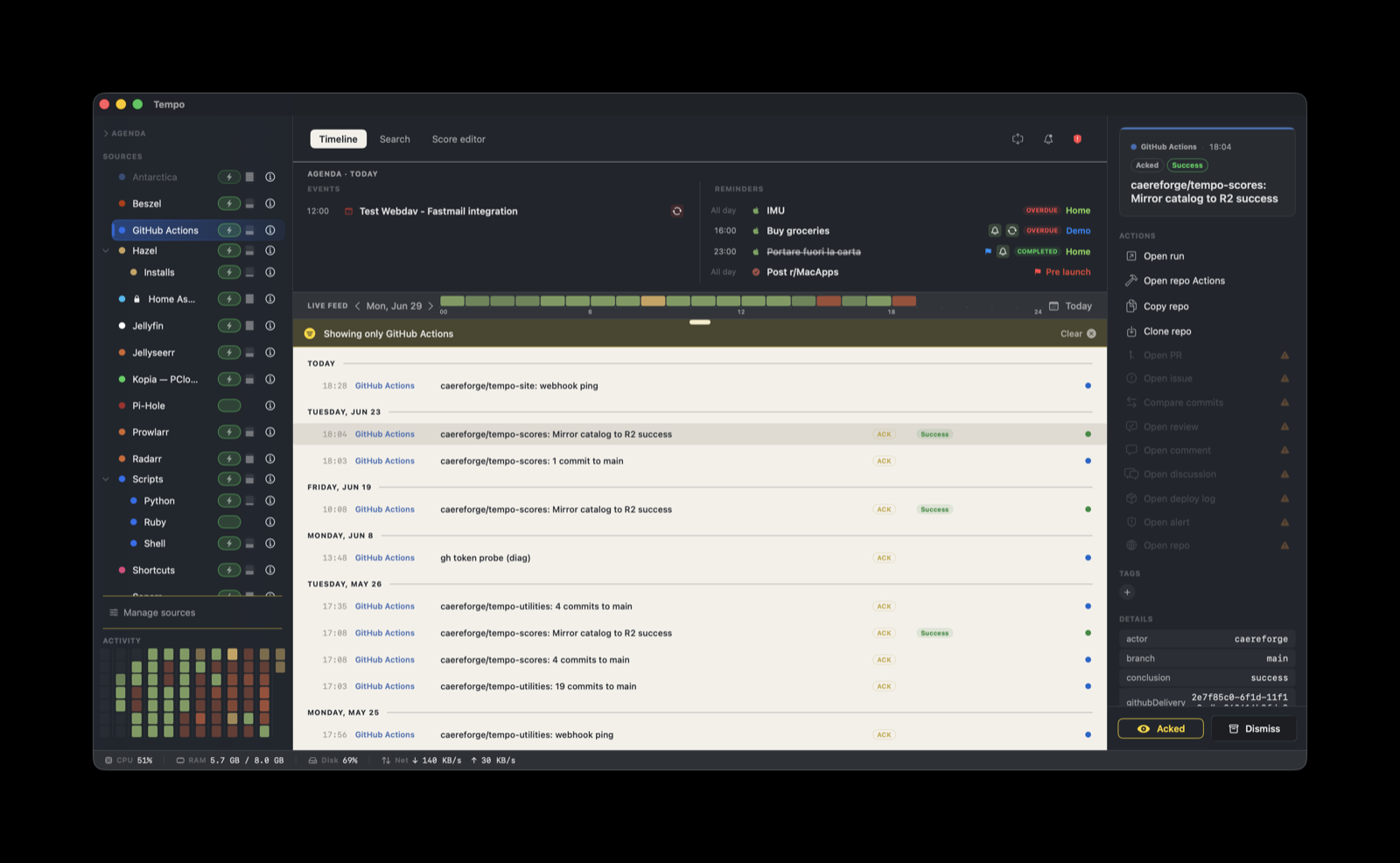
GitHub events do not reach Tempo directly. GitHub delivers webhooks from the public internet, and Tempo’s ingestion server listens on the LAN, not on a public address. A small relay bridges the two. Most of the work below is setting up that relay once.
How it works
github.com  (HTTPS webhook, signed with your secret)
      |
public tunnel  (cloudflared / Tailscale Funnel / ngrok)
      |  HTTPS, forwarded to localhost
relay.py  on 127.0.0.1:7777   (verifies the HMAC, builds a Tempo event)
      |  HTTP, loopback only
Tempo ingestion server  on 127.0.0.1:7776
The relay does three things on every request: it verifies GitHub’s X-Hub-Signature-256 HMAC and rejects anything unsigned or mismatched, it converts the GitHub payload into a Tempo event with a severity, and it forwards that event with the per-provider Tempo token. The token is read from a file, an environment variable, or the macOS Keychain, never written to disk.
The score handles what happens after the event lands: the badge label, the grouping, and the action buttons. Severity comes from the relay, because Tempo honors a sender-provided severity by default.
What you need
- A host that runs Python 3: macOS, Linux, Windows, or a container. The relay uses the standard library only, with no packages to install.
- Tempo running, with the GitHub score enabled in Manage Sources.
- A public tunnel that forwards to
localhost:7777. - A GitHub repository or organization where you can add a webhook.
The relay can run on the Mac that runs Tempo, or on any always-on machine on the LAN that can reach Tempo on port 7776.
1. Get the relay
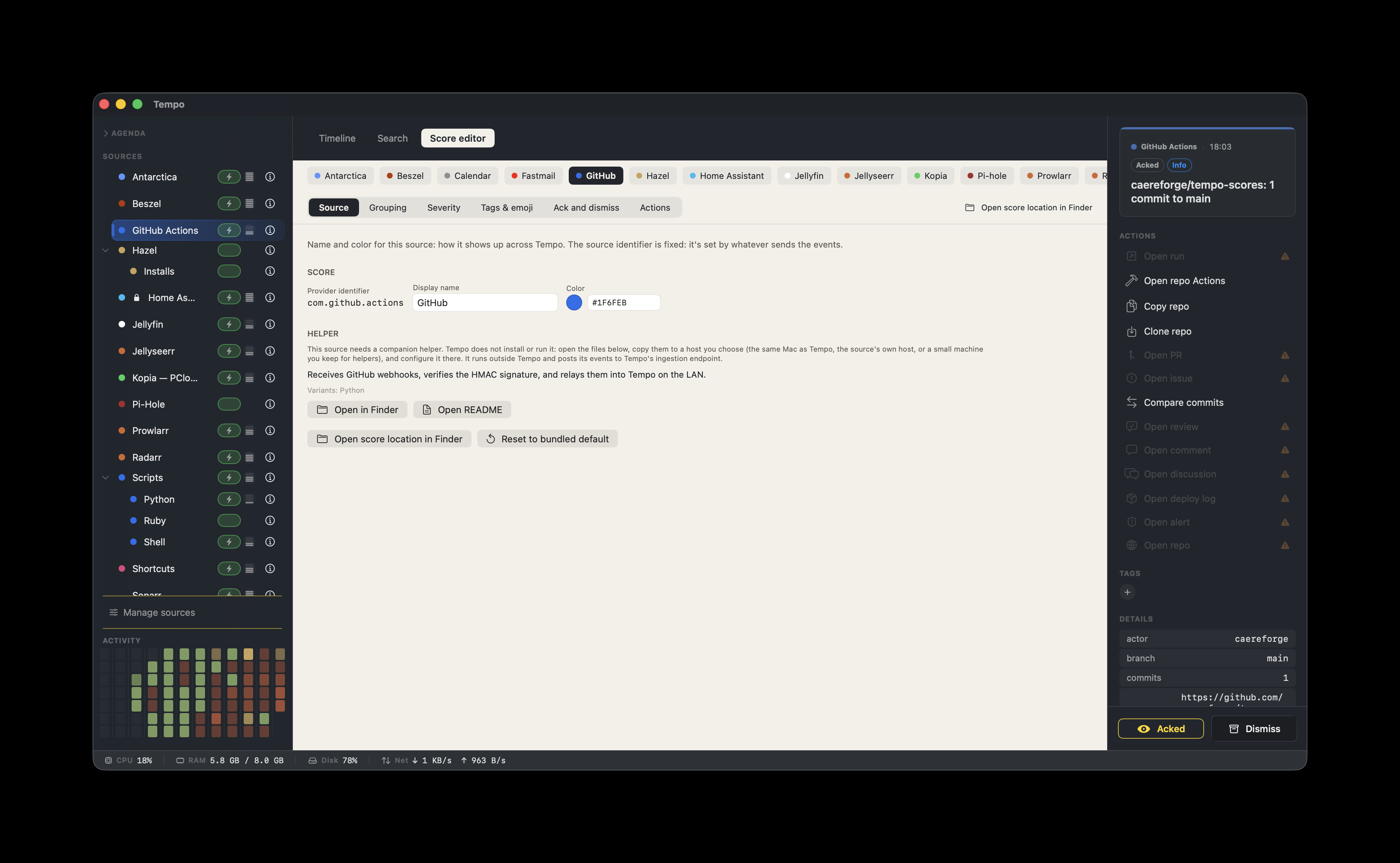
In the score’s Source tab (Score Editor), the Helper section has Open in Finder and Open README. Open in Finder copies the relay package (relay.py plus a launchd plist) to ~/Library/Application Support/Tempo/Integrations/com.github.actions/ and reveals it. Copy that folder to the host that will run the relay.
2. Expose the relay with a tunnel
GitHub posts from the public internet and cannot reach a LAN address, so the relay needs a public URL that forwards to its local port 7777. A tunnel provides that without opening a port on your router or exposing your home IP address. Cloudflare Tunnel (the cloudflared daemon) is the recommended option. Tailscale Funnel and ngrok work the same way.
Cloudflare Tunnel
Install cloudflared (Homebrew on macOS, the Cloudflare package or binary on Linux and Windows):
brew install cloudflaredAuthenticate once. This opens a browser to pick a domain on your Cloudflare account:
cloudflared tunnel loginCreate a named tunnel and route a hostname to it:
cloudflared tunnel create tempo-gh
cloudflared tunnel route dns tempo-gh webhooks.yourdomain.com
Write ~/.cloudflared/config.yml:
tunnel: <your-tunnel-id>
credentials-file: ~/.cloudflared/<your-tunnel-id>.json

ingress:
  - hostname: webhooks.yourdomain.com
    service: http://localhost:7777
  - service: http_status:404
Run it (step 4 covers starting it on boot):
cloudflared tunnel run tempo-ghA named tunnel keeps the same hostname across restarts. It needs a free Cloudflare account and a domain on Cloudflare’s DNS.
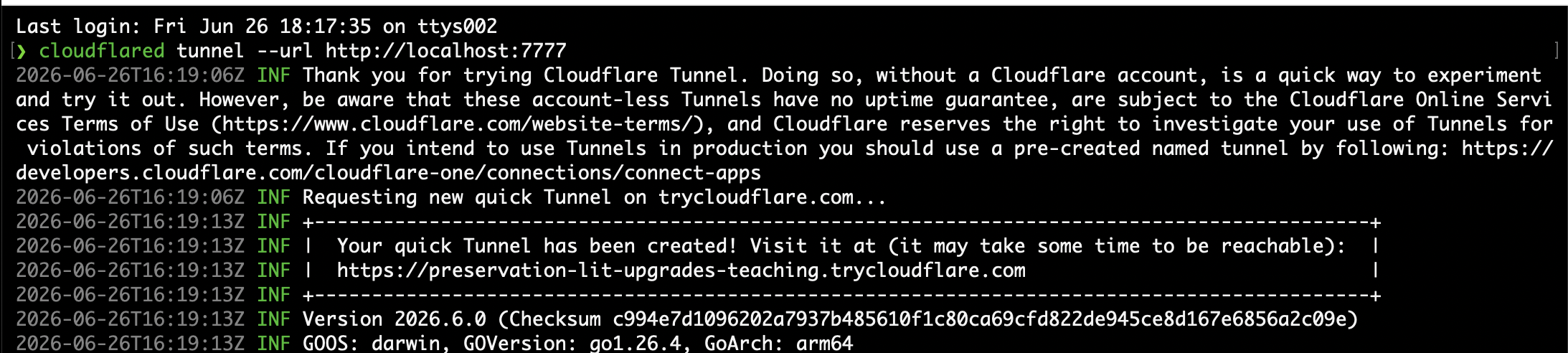
For a first test without a domain, a quick tunnel needs no account:
cloudflared tunnel --url http://localhost:7777It prints a https://<random>.trycloudflare.com address. That address is ephemeral: it changes every time cloudflared restarts, so you would have to update the GitHub webhook each time. It suits a quick test, not a permanent setup.
Alternatives
- Tailscale Funnel, if you already run Tailscale:
tailscale funnel 7777returns ahttps://<machine>.<tailnet>.ts.netURL. - ngrok, for quick testing:
ngrok http 7777. Free ngrok URLs also change on every restart.
Verify the tunnel once the relay is running (step 4):
curl -sI https://webhooks.yourdomain.com/health
# expects HTTP 200, body "tempo-gh-relay ok"
3. Store the two secrets
The relay reads two secrets at startup:
- The HMAC webhook secret, shared with GitHub, used to verify each request.
- The Tempo ingestion token, bound to
com.github.actions.
Generate a webhook secret:
python3 -c "import secrets; print(secrets.token_hex(32))"Create the Tempo token in Settings → Ingestion, bound to com.github.actions, and copy it.
The relay resolves each secret most-secure-source-first: a secret file, then an environment variable, then the macOS Keychain. Use the one that fits your host.
On macOS, the Keychain keeps both off disk:
security add-generic-password -s tempo-gh-relay  -a webhook-secret    -w '<HMAC secret>'
security add-generic-password -s tempo-ingestion -a com.github.actions -w '<Tempo token>'
On Linux, Windows, or in a container, set environment variables (TEMPO_GH_WEBHOOK_SECRET and TEMPO_TOKEN), or use the *_FILE form so the value never enters the environment: set TEMPO_GH_WEBHOOK_SECRET_FILE and TEMPO_TOKEN_FILE to a path. Point them at a Docker secret (/run/secrets/..., on tmpfs), a systemd-creds encrypted credential, or any chmod 600 file.
If a secret is found in none of the sources, the relay exits at launch with a message that names what is missing.
4. Run the relay as a service
The relay is a long-lived process and should restart on crash and on reboot.
macOS (launchd)
The package ships com.example.tempo-gh-relay.plist. Put relay.py somewhere permanent and load the agent:
mkdir -p ~/Library/Application\ Support/tempo-gh-relay
cp relay.py ~/Library/Application\ Support/tempo-gh-relay/relay.py
cp com.example.tempo-gh-relay.plist ~/Library/LaunchAgents/
Edit the plist so ProgramArguments points at the installed relay.py, then load it:
launchctl bootstrap gui/$(id -u) ~/Library/LaunchAgents/com.example.tempo-gh-relay.plist
launchctl list | grep tempo-gh-relay
Linux (systemd)
Create /etc/systemd/system/tempo-gh-relay.service:
[Unit]
Description=Tempo GitHub relay
After=network-online.target

[Service]
ExecStart=/usr/bin/python3 /opt/tempo-gh-relay/relay.py
Environment=TEMPO_GH_WEBHOOK_SECRET_FILE=/run/secrets/tempo-gh-webhook
Environment=TEMPO_TOKEN_FILE=/run/secrets/tempo-token
Restart=always

[Install]
WantedBy=multi-user.target
Then sudo systemctl enable --now tempo-gh-relay. Without systemd, a flock keepalive cron works as well.
Windows
The relay is pure Python 3, so it runs on Windows too. Provide the secrets as environment variables (or *_FILE paths), then keep python relay.py alive with a process supervisor: a Scheduled Task that runs at logon and restarts on failure, or a service wrapper such as NSSM or WinSW. cloudflared ships a native Windows build and can install itself as a Windows service.
5. Add the GitHub webhook
On the repository or organization, open Settings → Webhooks → Add webhook:
- Payload URL: your tunnel address plus
/gh, for examplehttps://webhooks.yourdomain.com/gh - Content type:
application/json - Secret: the HMAC secret from step 3, exactly
- Which events: pick from the table below, or “Send me everything”. Unhandled events are acknowledged and dropped.
- Active: on
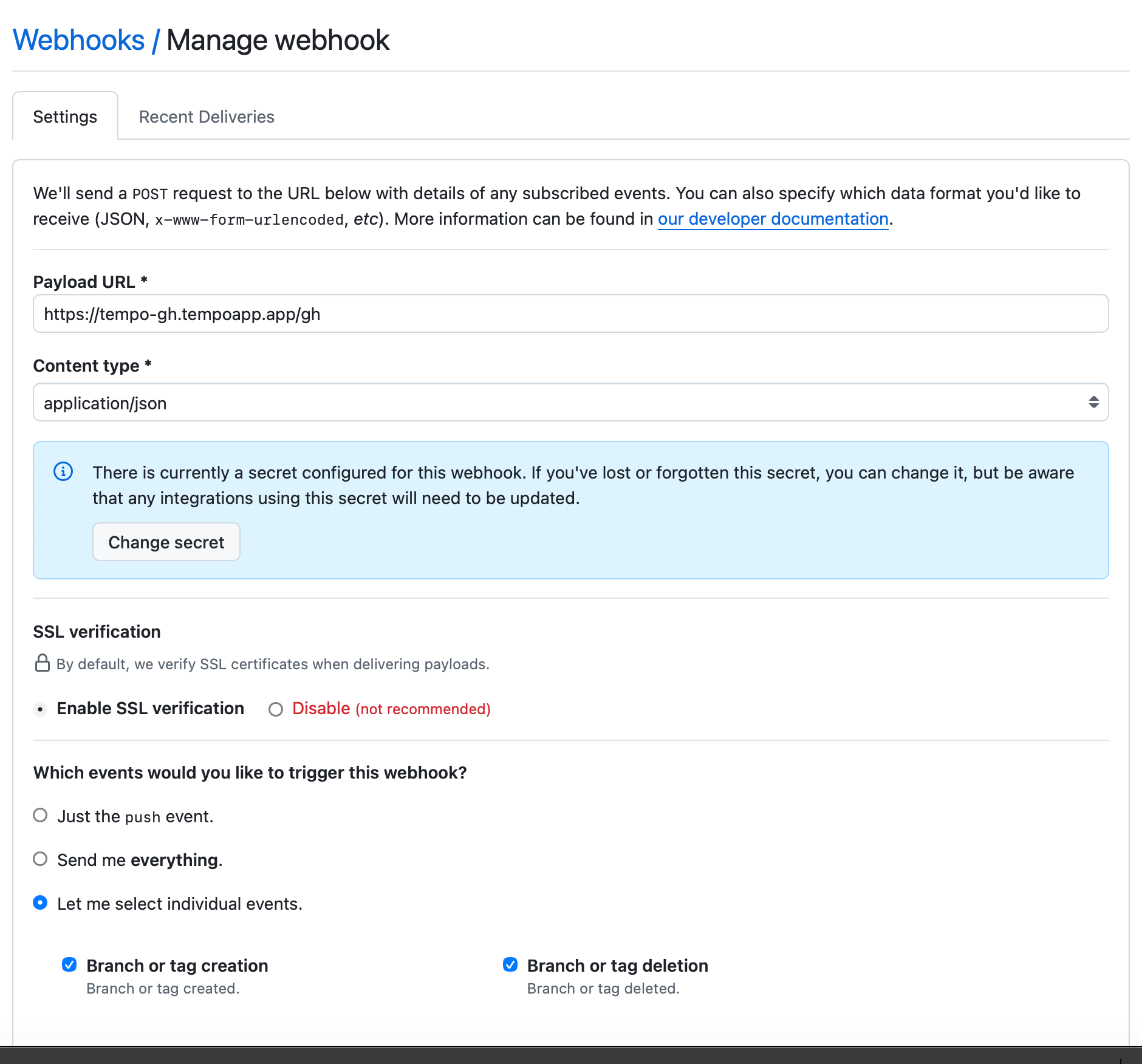
GitHub sends a ping immediately. A healthy setup shows an event in Tempo titled <repo>: webhook ping. For an organization, a single org-level webhook covers every repository, under https://github.com/organizations/<org>/settings/hooks.
What the relay forwards
The relay translates these event types and sets the severity shown. Any other event is acknowledged to GitHub (HTTP 204) and not forwarded.
| GitHub event | Forwarded when | Severity |
|---|---|---|
ping | Webhook setup probe | info |
push | Commit count above zero | info |
pull_request | opened, reopened, closed, ready_for_review | info |
pull_request_review | submitted | ok if approved, warning if changes requested |
issues | opened, reopened, closed | info |
issue_comment | created | info |
pull_request_review_comment | created | info |
workflow_run | completed | info, error on failure |
release | published, released | info |
star | created | info |
deployment_status | success, failure, error (pending is skipped) | ok or error |
dependabot_alert | any action | critical for critical/high, otherwise warning |
security_advisory | any action | critical for critical/high, otherwise warning |
create, delete | branch or tag created or deleted | info |
discussion | created, answered | info, ok when answered |
For issue, pull request, and workflow run events the score also sets the badge label: Opened, Closed, Reopened, Merged, Ready for review, Success, Failed, Cancelled, Timed out, Running, Queued. Other event types keep the relay’s severity with the default Info label.
Grouping and actions
Events stack within a one-day window: issue events per issue (repository and issue number), pull request events per pull request, workflow runs per repository and workflow name. A repeatedly failing pipeline reads as one entry rather than one row per run.
Five actions are attached to every event:
- Open run: opens the workflow run at
${metadata.runUrl}. It renders disabled for events without a run URL, such as an issue or a pull request. - Open repo Actions: opens
https://github.com/${metadata.repo}/actions. - Copy repo: copies the
owner/namestring. - Clone repo: opens Terminal with
git clonefor the repository. - GitHub Actions docs: opens the official documentation.
Configuration
The relay’s defaults fit most setups. To change one, edit the constants at the top of relay.py: LISTEN_HOST (127.0.0.1), LISTEN_PORT (7777), TEMPO_URL (http://127.0.0.1:7776/ingest), PROVIDER_ID (com.github.actions).
Troubleshooting
missing secret: ...at launch: the relay found the secret in none of its sources. Provide it through a file, an environment variable, or the Keychain, and check the service or account name for a typo.- GitHub shows
401 missing signature: the webhook content type is notapplication/json, or no secret is set on GitHub. - GitHub shows
401 bad signature: the secret on GitHub differs from the one the relay holds. Regenerate it and set both. - GitHub shows timeouts or connection refused: the relay is not running, or the tunnel does not point at
localhost:7777. Check the service status. - The relay logs
tempo unreachable: Tempo’s ingestion server is not listening on127.0.0.1:7776. Confirm Tempo is running. - Events arrive but render without styling: the GitHub score is not enabled. Enable it in Manage Sources.