Hazel is a macOS file automation tool: it watches folders and runs rules when files match conditions. This score brings each rule fire onto your Tempo timeline as an event, with buttons to open the matched file, jump to the source or destination folder, or copy the path. It is read-only: Tempo shows what a rule did and never moves files back.
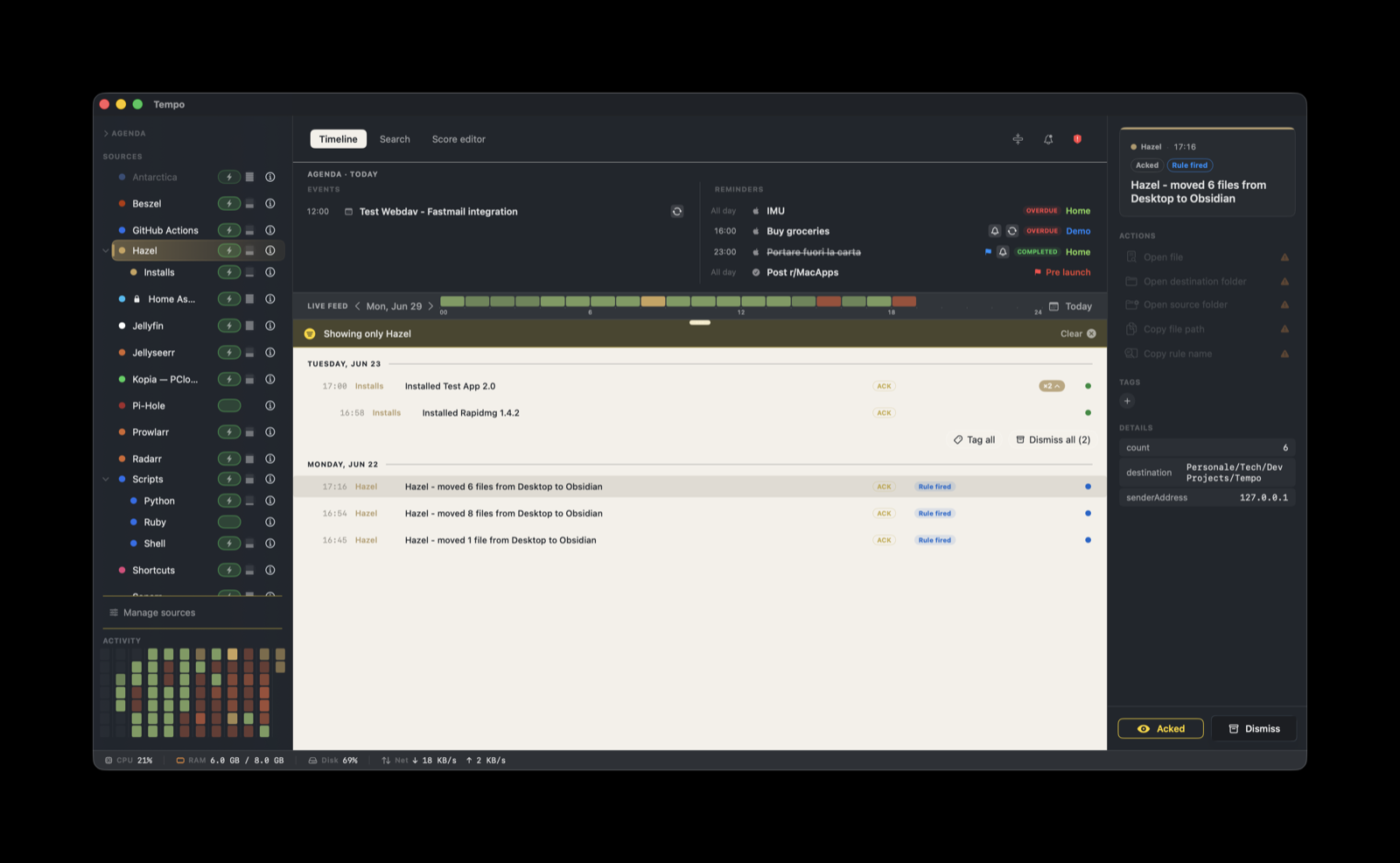
Hazel does not ship a webhook transport, and it does not need one. Every rule can run an embedded shell script, and a few lines of curl are enough to POST a Tempo event. There is no daemon and no relay: the script runs inside Hazel each time the rule fires, and posts straight to Tempo’s ingestion server.
How it works
Hazel rule fires
      |  Run shell script action (embedded), runs once per matched file
curl POST  to Tempo's /ingest, with the per-provider token
      |  HTTP, LAN or loopback
Tempo ingestion server  on <your-mac>:7776
Hazel passes the matched file path to the script as $1 and exposes the rule name, watched folder, and destination folder as environment variables. The script packs those into a JSON payload and POSTs it. Tempo’s /ingest endpoint accepts that JSON directly, so there is nothing to install on the Tempo side beyond enabling the score. The score handles everything after the event lands: the color, the grouping, and the five action buttons.
Setup
- Tempo ships this score built-in. It is seeded into
~/Library/Application Support/Tempo/Scores/on first launch, so there is nothing to download. - In Tempo, open Manage Sources and enable Hazel. Built-in scores are activated there; only the generic Scripts source auto-installs.
- In Tempo Settings → Ingestion, add a token bound to
com.noodlesoft.hazel. Copy the token; you will paste it into the shell script. A token bound to that identifier accepts everycom.noodlesoft.hazel.*provider, including deeper ones likecom.noodlesoft.hazel.scanner.office, so one token covers all of your Hazel rules. The score still caps a sub-source at one level belowcom.noodlesoft.hazel, socom.noodlesoft.hazel.scanner.officeis accepted but grouped underscanner(the Sub-sources section below explains this). - Note your Tempo endpoint:
http://<your-mac-hostname>:7776/ingest, or127.0.0.1if Hazel runs on the same Mac as Tempo, which is the common case. - Add the shell action to a rule, as described next.
Add the shell action in Hazel
Edit the rule you want Tempo to receive notifications for. Add an action of type Run shell script, set it to Embedded script, and paste this template:
#!/bin/bash
# Notify Tempo whenever this Hazel rule fires.
# Hazel exposes:
#   $1                 -> matched file path
#   $HAZEL_RULE_NAME   -> rule name
#   $HAZEL_FOLDER      -> folder being watched
#   $HAZEL_DEST_FOLDER -> destination folder (when the rule moves files)

TEMPO_HOST="127.0.0.1:7776"
TEMPO_TOKEN="paste-your-hazel-token-here"
PROVIDER="com.noodlesoft.hazel"

curl -sS -X POST "http://$TEMPO_HOST/ingest" \
  -H "X-Tempo-Token: $TEMPO_TOKEN" \
  -H "Content-Type: application/json" \
  -d "$(cat <<EOF
{
  "title": "$HAZEL_RULE_NAME - $(basename "$1")",
  "providerIdentifier": "$PROVIDER",
  "eventType": "alert",
  "metadata": {
    "path":   "$1",
    "rule":   "$HAZEL_RULE_NAME",
    "folder": "$HAZEL_FOLDER",
    "dest":   "$HAZEL_DEST_FOLDER"
  }
}
EOF
)"
Replace TEMPO_TOKEN with the value you copied in step 3. If Hazel runs on a different Mac than Tempo, replace 127.0.0.1 with the Tempo Mac’s hostname or IP.
The script runs once per matched file, so a rule that touches several files posts one event each. You can attach the same action to as many rules as you want: $HAZEL_RULE_NAME differentiates them in the feed. To keep the token out of every rule, store it in the macOS Keychain once and read it at run time:
security add-generic-password -s tempo-ingestion -a com.noodlesoft.hazel -w '<token>'
# then in the script:
TEMPO_TOKEN="$(security find-generic-password -s tempo-ingestion -a com.noodlesoft.hazel -w)"
The metadata keys the score reads are path, dest, folder, and rule. Each one feeds an action button, so include them when the rule has them.
Sub-sources
Tempo recognizes provider identifiers of the form com.noodlesoft.hazel.<suffix> and nests each one as a child row under the Hazel parent in the source panel, the same way Apple Calendar and Reminders nest under Apple. By default every rule POSTs under the bare com.noodlesoft.hazel, so all rules appear together as a single Hazel row, distinguished only by event title. That works for one or two rules and gets crowded with a dozen.
There are no bundled sub-scores. Tempo ships only this one Hazel score, and it does not create any com.noodlesoft.hazel.<suffix> children for you. You make your own sub-sources by choosing a suffix and posting under it, for example:
com.noodlesoft.hazel.mail: rules that hand off email (receipts, shipping notices)com.noodlesoft.hazel.photos:~/Picturesimport and organization rulescom.noodlesoft.hazel.downloads:~/Downloadscleanup and triage rules
To use one, set PROVIDER in the script to the dotted identifier instead of the bare one. The single Hazel score styles all of them: every com.noodlesoft.hazel.* sub-source inherits the same five actions and the same severity, so there is nothing extra to install or author, and the token bound to the parent already accepts them.
Use one level only. The sub-source is the first segment after com.noodlesoft.hazel: com.noodlesoft.hazel.scanner is Scanner. Anything deeper rolls up into it, so com.noodlesoft.hazel.scanner.invoices still shows under Scanner, with the deeper name kept for the action panel. Make as many first-level sub-sources as you like, but do not nest past one.
What you’ll see
Each event reads as the rule name plus the file, for example:
Sort photos by date - IMG_4521.HEICThe score sets the Info severity by default. Because the score has senderSeverityWins set, a metadata.severity value in your POST overrides that default, so a rule can mark a particular fire as warning or error if you want it to stand out. Events carry the metadata that the script sent: the file path, the rule name, the watched folder, and the destination folder.
Grouping and actions
Events stack within a one-day window. The score groups on ${metadata.runID} first, then ${metadata.rule}, then ${metadata.folder}. The runID key takes priority so that a single rule run, even one that posts several steps, collapses into one entry rather than scattering down the timeline. If your script does not send a runID, events fall back to grouping by rule, then by watched folder. To collapse a multi-step rule into one stack, generate a run id once at the start of the rule and pass the same value on every post.
Five actions are attached to every event. Each interpolates a metadata value, and an action whose value is missing renders disabled rather than opening nothing:
- Open file: opens the matched file at
file://${metadata.path}in its default app. - Open destination folder: opens
file://${metadata.dest}, the folder Hazel moved or copied the file to. Disabled for rules that do not move files, since they send nodest. - Open source folder: opens
file://${metadata.folder}, the folder Hazel was watching. - Copy file path: copies
${metadata.path}to the clipboard. - Copy rule name: copies
${metadata.rule}to the clipboard.
Troubleshooting
If Hazel rules fire but no event reaches Tempo, run these in Terminal in order until one fails:
# 1. Reachability: does Tempo's port respond?
curl -sS -o /dev/null -w "%{http_code}\n" http://127.0.0.1:7776/health
# 2. Token and payload: does a manual POST land in Tempo?
curl -sS -X POST http://127.0.0.1:7776/ingest \
-H "X-Tempo-Token: paste-token" \
-H "Content-Type: application/json" \
-d '{"title":"hazel test","providerIdentifier":"com.noodlesoft.hazel","eventType":"alert","metadata":{}}'# 3. Hazel's own log: confirm the rule and script ran
log stream --predicate 'process == "Hazel"' --info --last 5m# 4. Tempo's ingestion log
log show --predicate 'subsystem == "app.tempoapp.Tempo" AND category == "Ingestion"' --info --last 5m | grep -i hazelCommon failure modes:
- HTTP 403 from Tempo: the token is not authorized for
com.noodlesoft.hazel. In Settings → Ingestion, edit the token and bind it to that exact identifier, or to thecom.noodlesoft.hazelprefix so sub-sources are covered too. - HTTP 422: the JSON payload is malformed, commonly a path with embedded quotes that broke the heredoc. Keep
$1wrapped as written in the template; the heredoc handles escaping. - No event at all: Hazel did not run the script. Check the rule preview in Hazel and confirm the conditions match. Hazel fires actions only for rules whose conditions match the file.
- Event arrives without styling: the Hazel score is not enabled. Turn it on in Manage Sources.