Jellyseerr is a media request manager for Jellyfin, Emby, and Plex. Users browse for movies and shows and submit requests; each request moves through approval, download, and availability. A built-in issue tracker handles problems that turn up after a title is available, such as a bad file or a wrong episode.
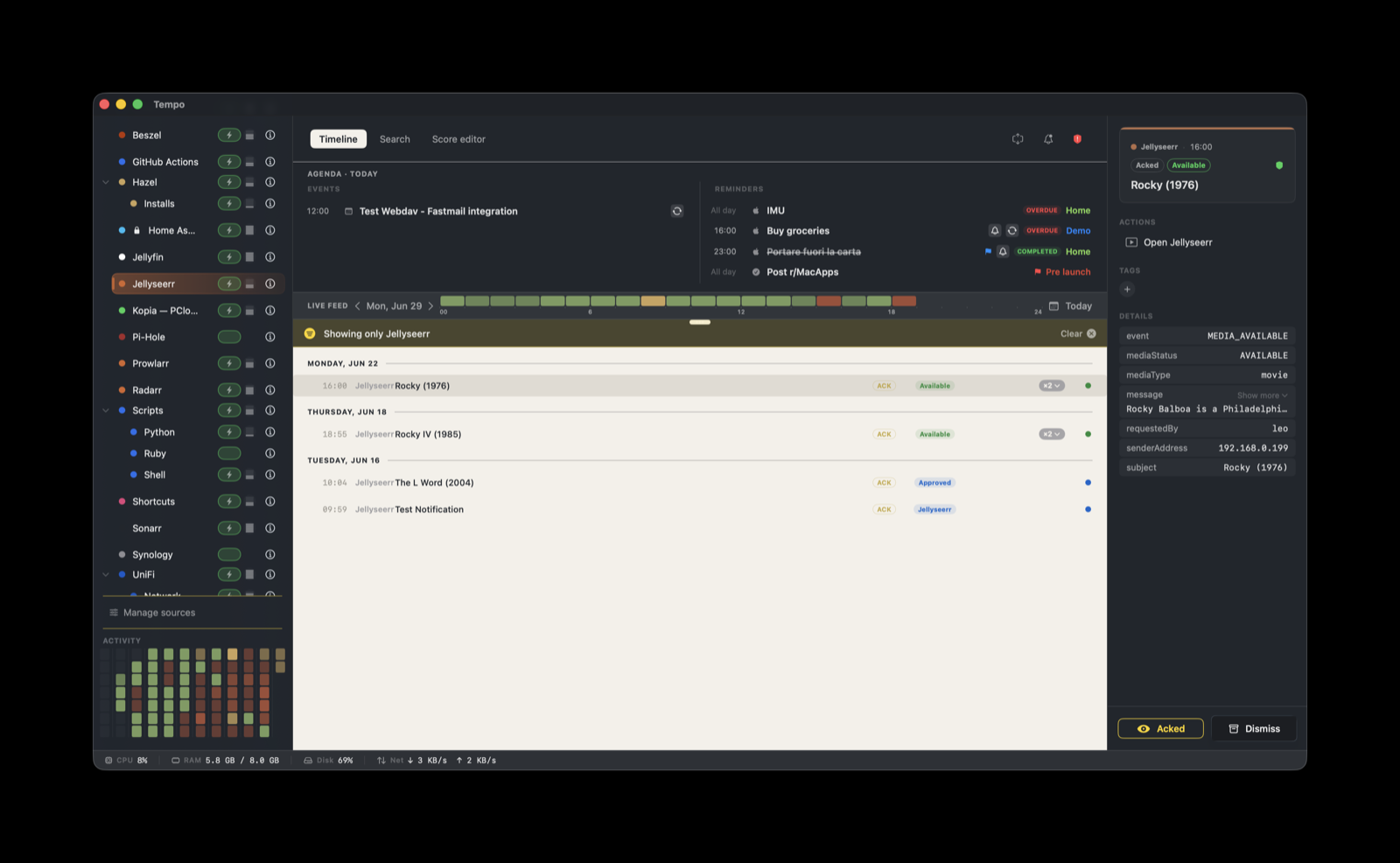
This score renders those notifications on the Tempo timeline. It reads Jellyseerr’s notification_type, assigns a severity and label per state, groups every event by its media title, and attaches one action that opens Jellyseerr.
How it works
Jellyseerr ships a native Webhook notification agent. It POSTs a JSON body that you define directly to Tempo’s ingestion endpoint. No helper, relay, or adapter runs on either side.
Jellyseerr  (Webhook notification agent)
      |  HTTP POST, your JSON template, bearer token
Tempo ingestion server  on <your-mac-host>:7776/ingest
You control the payload through Jellyseerr’s payload template, so the job is to map Jellyseerr’s template variables onto the metadata keys this score reads.
Setup
The score is built in. Tempo seeds it on first launch, so there is nothing to download. Enable it in Manage Sources if it is not already on.
- In Tempo, open Settings → Ingestion and add a token bound to
com.jellyseerr. Copy it. - Note your Tempo ingest endpoint:
http://<your-mac-host>:7776/ingest. Jellyseerr must be able to reach that host and port on your LAN. - In Jellyseerr, open Settings → Notifications → Webhook and enable the agent.
- Set the Webhook URL to
http://<your-mac-host>:7776/ingest. - Set the Authorization Header to
Bearer YOUR_TOKEN_HERE, using the token you bound tocom.jellyseerr. - Replace the default JSON Payload with the template below.
- Pick the notification types you want under Notification Types, then save.
- Use Jellyseerr’s Test button to send a sample event and confirm it lands in Tempo.
JSON payload template
{
  "title": "{{subject}}",
  "eventType": "alert",
  "providerIdentifier": "com.jellyseerr",
  "metadata": {
    "event": "{{notification_type}}",
    "subject": "{{subject}}",
    "senderAddress": "<your-jellyseerr-host>"
  }
}
The score reads three metadata keys, and the webhook must send all three:
event: Jellyseerr’s{{notification_type}}(for exampleMEDIA_PENDING,MEDIA_AVAILABLE,ISSUE_CREATED). This selects the severity and label.subject: the media title, taken from Jellyseerr’s{{subject}}. The score groups by this value, so one request stays a single line as it changes state.senderAddress: the host where Jellyseerr runs. The Open Jellyseerr action buildshttp://<senderAddress>:5055from it. Jellyseerr does not provide this as a template variable, so set it to a literal address.
What you’ll see
Each notification lands as one event, grouped by media title, with a severity badge derived from its event value:
event | Severity | Label |
|---|---|---|
MEDIA_FAILED | error | Failed |
MEDIA_PENDING | warning | Pending approval |
ISSUE_CREATED | warning | Issue opened |
ISSUE_REOPENED | warning | Issue opened |
MEDIA_APPROVED | info | Approved |
MEDIA_AUTO_APPROVED | info | Approved |
MEDIA_DECLINED | info | Declined |
MEDIA_AVAILABLE | ok | Available |
ISSUE_RESOLVED | ok | Resolved |
Any other event value falls through to the default info severity with the label Info.
Grouping and actions
Grouping uses ${metadata.subject}, the media title. As a request moves from pending approval to approved to available, each notification updates the same timeline line instead of adding a new one, and the badge reflects the latest state.
Every event carries one action:
- Open Jellyseerr: opens
http://${metadata.senderAddress}:5055in your browser.
The action depends on senderAddress being set in the payload. If it is missing, the URL is incomplete and the action will not reach Jellyseerr.
Troubleshooting
- No events arrive after a test: confirm the Webhook URL points at
http://<your-mac-host>:7776/ingestand that Jellyseerr’s host can reach your Mac on port 7776 over the LAN. Loopback addresses on the Jellyseerr host will not reach Tempo. - Events are rejected: check that the Authorization Header is
Bearer <token>and that the token is bound tocom.jellyseerrin Settings → Ingestion. - Events arrive but render without styling: the Jellyseerr score is not enabled. Turn it on in Manage Sources.
- Every event reads as
Info: the payload is not sendingevent, or it is not set to{{notification_type}}. Confirm the metadata block in the JSON template. - A request shows as several separate lines:
subjectis missing or differs between notifications. Make sure the template sends{{subject}}asmetadata.subject. - Open Jellyseerr does nothing useful:
senderAddressis unset or wrong. Set it to the address where Jellyseerr’s web UI runs (port5055).