Kopia is a fast, encrypted backup tool that snapshots files to a local or remote repository. This score teaches Tempo to read Kopia’s snapshot notifications and turn each run into a timeline event. It classifies the event by the snapshot outcome, shows the size delta as a headline on success, and reports failures and warnings as events you can act on.
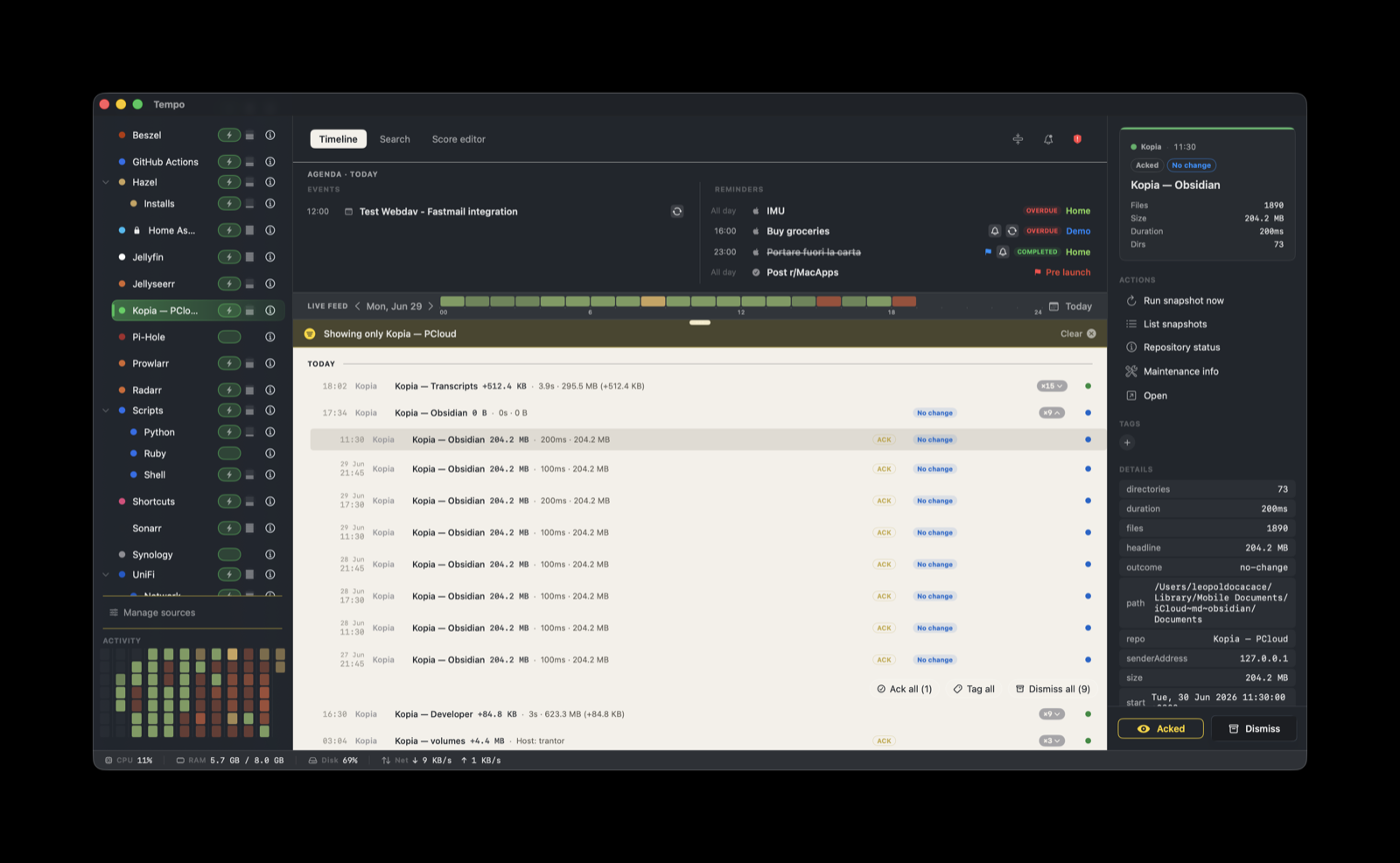
Kopia is stateless in Tempo. Each snapshot run is a distinct event with its own externalID, so a new run never overwrites an earlier one. Runs of the same backup source stack together instead. The grouping key is ${metadata.repo}/${metadata.path}, falling back to ${metadata.path}, so repeated snapshots of the same source collapse into one stack you can expand.
How it works
Kopia posts to Tempo on its own. There is no relay or helper daemon on the Tempo side. When a snapshot finishes, Kopia calls a Webhook notification profile that you configure in KopiaUI (or with the kopia notification CLI). That webhook sends a POST straight to Tempo’s ingestion endpoint on your LAN.
kopia snapshot finishes
      |
KopiaUI Webhook notification profile  (POST + X-Tempo-Token header)
      |  HTTP, on your LAN
Tempo ingestion server  on <your-mac-ip>:7776
The score handles everything after the event lands: the badge label, the severity, the grouping, and the action buttons. Kopia sends a raw webhook payload, and the built-in score formats it.
Install
The Kopia score ships built in and is seeded on first launch. There is nothing to download or import.
- In Tempo Settings → Ingestion, add a token bound to
com.kopiaand copy it. - Your Tempo endpoint is
http://<your-mac-ip>:7776/ingest. - Configure Kopia to POST there (next section).
Configure Kopia
In KopiaUI (or with kopia notification), add a Webhook notification profile:
- URL:
http://<your-mac-ip>:7776/ingest - Method: POST
- Header:
X-Tempo-Token: <token>(the token you copied from Settings → Ingestion)
KopiaUI sends the webhook automatically when a snapshot run finishes. Nothing else needs to be installed on the Kopia side. Adjust presentation later in Tempo’s Score Editor.
What you’ll see
The score sets severity from the snapshot outcome. The default for an unrecognized outcome is an info event labeled Info.
outcome | Severity | Badge label |
|---|---|---|
error | error | Backup failed |
warning | warning | Warning |
ok | ok | ${metadata.headline} (for example +95.8 MB) |
no-change | info | No change |
On a successful run the badge label is the headline metric Kopia reports, typically the size delta. A failed run reads as an error you can act on, and no-change is a quiet info row for a run where nothing changed since the previous snapshot.
Grouping and actions
Snapshots stack per source. The grouping key is ${metadata.repo}/${metadata.path}, with ${metadata.path} as the fallback, so successive runs of one backup source collapse into a single expandable stack rather than one row per run.
Four actions are enabled on every event. Each opens Terminal and runs against the kopia CLI, which works alongside a running KopiaUI server:
- Run snapshot now:
kopia snapshot create ${metadata.path} - List snapshots:
kopia snapshot list ${metadata.path} - Repository status:
kopia repository status - Maintenance info:
kopia maintenance info
Three more actions ship in the score but are disabled:
- Open KopiaUI (desktop app)
- Open Kopia server (web UI)
- Kopia docs
Since a 2026 KopiaUI update, KopiaUI’s window is a menubar-icon popover. No external app, Tempo included, can open it, and clicking its own Dock icon will not show it either. Use KopiaUI’s menubar icon to open the window. The web-UI button is disabled because it needs a server URL that the KopiaUI webhook does not send. You can enable any of the three in the Score Editor’s Actions tab if your setup supports them.
In the Score Editor’s Source tab you can assign a friendly name to a backup source, so a long snapshot path reads as something recognizable at a glance, such as “Photos” or “Trantor /etc”.
Troubleshooting
- No events arrive after a snapshot: confirm the Webhook profile points at
http://<your-mac-ip>:7776/ingestand that theX-Tempo-Tokenheader matches the token bound tocom.kopiain Settings → Ingestion. Check Tempo’s rejection audit log if the token is wrong. - Events arrive but render without styling: the Kopia score is not enabled. Enable it in Manage Sources.
- A
kopiaCLI action reports “command not found”: thekopiabinary is not on the PATH of the shell Terminal opens. Install it or adjust your shell profile. - “Open KopiaUI” or “Open Kopia server” do nothing: these are disabled by default for the reasons above. Open KopiaUI from its menubar icon instead.