This score renders Pi-hole state on the Tempo timeline: whether DNS blocking is enabled or disabled, whether Pi-hole is reachable, and, optionally, whether a component update is available, whether the blocklist (“gravity”) was refreshed, and whether the host is under high load. It is read-only. The actions open the admin pages or copy the server URL, and nothing writes back to Pi-hole.
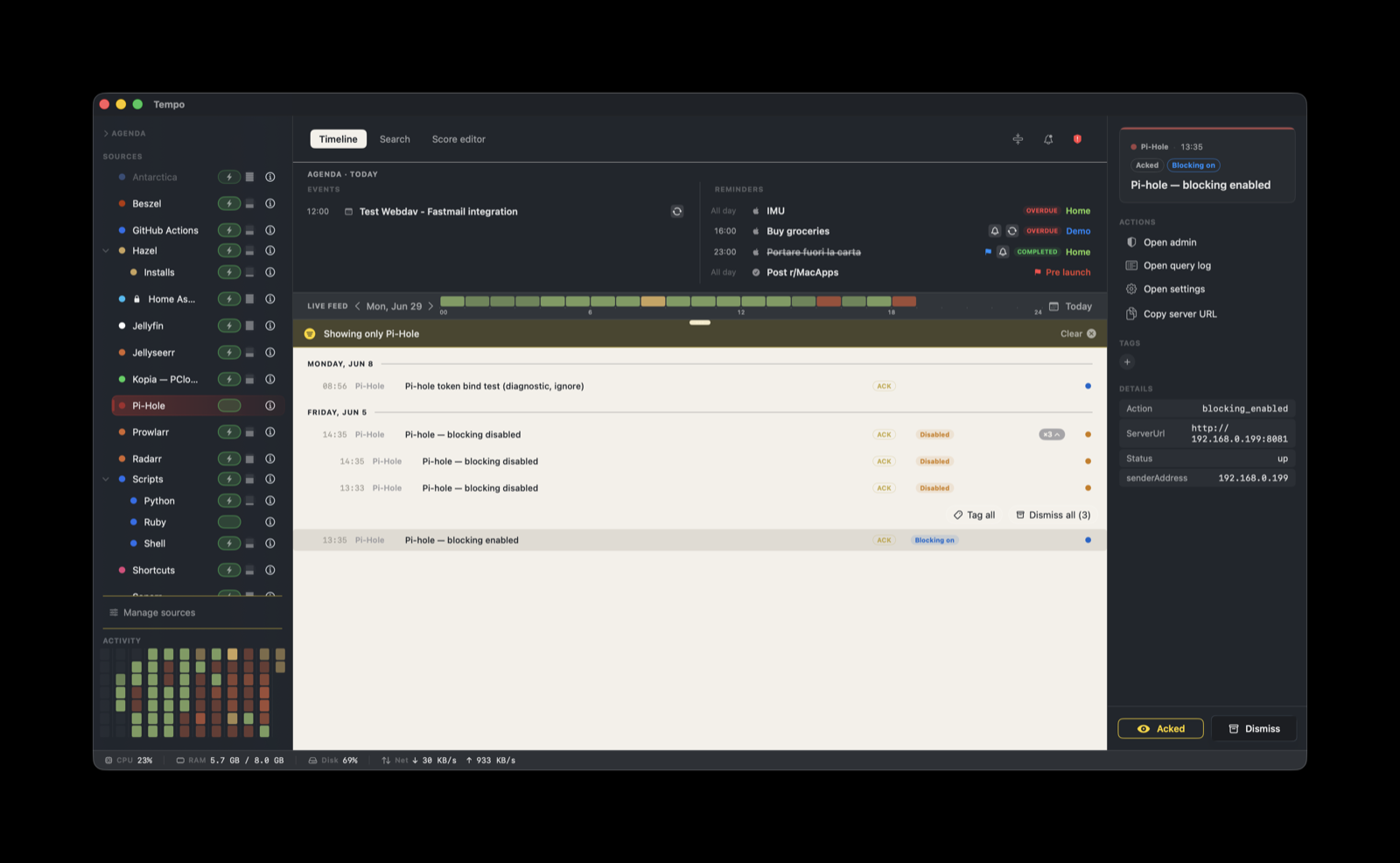
Pi-hole has no outbound webhook, so it cannot push to Tempo on its own. A small helper script polls Pi-hole’s API and posts an event to Tempo when something changes. Most of the work below is setting up that helper once.
How it works
Pi-hole  (FTL HTTP API, v6)
      |  POST /api/auth  ->  session id (SID)
      |  GET  /api/dns/blocking, /api/info/version, ...
helper  on a host near Pi-hole   (reads state, builds a Tempo event)
      |  HTTP POST, LAN
Tempo ingestion server  on <mac>:7776
      |  DELETE /api/auth   (frees the API session)
The helper is an API poller. On each run it authenticates once with POST /api/auth, reads the current state, posts a Tempo event only when the state changed since the last run, then deletes its session with DELETE /api/auth. Authenticating every run without deleting the session eventually exhausts Pi-hole’s API seats and returns api_seats_exceeded, so the cleanup matters.
The helper is stateful. It keeps the last reported value on disk (under $XDG_STATE_HOME/pihole-tempo/, or ~/.local/state/pihole-tempo/) and posts only on a transition, so a steady Pi-hole produces no feed noise. Tempo collapses the events into one row per signal through grouping.
What you need
- A host that can reach both Pi-hole and Tempo, typically the machine next to Pi-hole. Linux or macOS both work; the secrets live in a local
.envfile, so the helper is not tied to a Mac. python3,curl, andjqon that host.- Pi-hole v6 (the
/api/*endpoints). See the v5 note at the end for the legacy PHP API. - Tempo running, with the Pi-hole score enabled in Manage Sources.
The Pi-hole password is used only against Pi-hole to open a session. Tempo receives only the parsed state, never the password.
1. Create the Tempo token
In Tempo, open Settings > Ingestion and create a token bound to net.pi-hole.pi-hole. Copy it. Note your Tempo endpoint: http://<mac-running-tempo>:7776/ingest.
The host running the helper must reach the Mac on port 7776. Allow it in the macOS firewall (or Little Snitch), and optionally restrict the token to that host’s IP with its allowlist in Settings > Ingestion.
2. Get the helper
In the score’s Source tab (Score Editor), the Helper section has Open in Finder and Open README. Open in Finder copies the helper package to ~/Library/Application Support/Tempo/Integrations/net.pi-hole.pi-hole/ and reveals it. Copy that folder to the host that will run the poller, then follow its Open README or the steps below.
The package contains pihole-tempo.sh (one poll, posts on a state change) and pihole-run.sh (loads pihole.env and runs the watcher once, for cron or a service).
3. Configure pihole.env
Create pihole.env next to the scripts:
export TEMPO_URL="http://<mac-running-tempo>:7776/ingest"
export PIHOLE_URL="http://<pihole-host>"

# Secrets read from their own chmod 600 files, not stored in this env file:
export TEMPO_TOKEN_FILE="$HOME/.pihole-tempo/tempo-token"
export PIHOLE_PASS_FILE="$HOME/.pihole-tempo/pihole-pass"
Use a Pi-hole app-password rather than the admin password. To keep it simple you can set TEMPO_TOKEN and PIHOLE_PASS inline instead, since the env file is chmod 600 (see below).
Optional signals
Blocking state and reachability are always reported. Three more signals are on by default and each can be switched off independently:
| Signal | Env flag (default on) | What triggers it |
|---|---|---|
| Update available | PIHOLE_EMIT_UPDATE | any component (core / web / FTL / docker) has local != remote |
| Blocklist (gravity) updated | PIHOLE_EMIT_GRAVITY | gravity’s blocked-domain count changes |
| High load | PIHOLE_EMIT_LOAD | 15-minute CPU load over PIHOLE_LOAD_THRESHOLD (percent of one core, default 200) |
Set a flag to 0 to silence that signal. Load is kept ignorable on purpose: CPU load is noisy on a DNS resolver, so set PIHOLE_EMIT_LOAD=0 if you already watch host load with another tool such as Beszel.
Keeping secrets out of plaintext (*_FILE)
You do not have to leave the token or the Pi-hole password in a plaintext .env. Each secret also resolves from a file: set TEMPO_TOKEN_FILE and PIHOLE_PASS_FILE to paths and the helper reads them from there, so the values never enter the environment. Point them at a Docker secret (/run/secrets/..., on tmpfs), a systemd-creds encrypted credential, or any chmod 600 file. Resolution order per secret is file, then environment variable.
4. Run the helper as a daemon
pihole-run.sh performs one poll. Run it on a roughly 15-second cadence so transitions are caught quickly. Keep pihole.env, the log, and the state file out of version control.
macOS (launchd)
Run the watcher in a loop under a LaunchAgent and let launchd restart it on logout or reboot. A minimal agent that keeps a sleep loop alive:
<?xml version="1.0" encoding="UTF-8"?>
<!DOCTYPE plist PUBLIC "-//Apple//DTD PLIST 1.0//EN"
  "http://www.apple.com/DTDs/PropertyList-1.0.dtd">
<plist version="1.0">
<dict>
  <key>Label</key><string>app.tempo.pihole</string>
  <key>ProgramArguments</key>
  <array>
    <string>/bin/sh</string>
    <string>-c</string>
    <string>while true; do /path/to/pihole-run.sh; sleep 15; done</string>
  </array>
  <key>RunAtLoad</key><true/>
  <key>KeepAlive</key><true/>
</dict>
</plist>
Save it as ~/Library/LaunchAgents/app.tempo.pihole.plist, then load it:
launchctl bootstrap gui/$(id -u) ~/Library/LaunchAgents/app.tempo.pihole.plist
launchctl list | grep app.tempo.pihole
Linux (systemd)
Create /etc/systemd/system/tempo-pihole.service:
[Unit]
Description=Tempo Pi-hole poller
After=network-online.target

[Service]
EnvironmentFile=/opt/tempo-pihole/pihole.env
ExecStart=/bin/sh -c 'while true; do /opt/tempo-pihole/pihole-run.sh; sleep 15; done'
Restart=always

[Install]
WantedBy=multi-user.target
Then sudo systemctl enable --now tempo-pihole.
Without systemd, a flock keepalive cron works. The runner is idempotent, so staggering four runs per minute gives roughly a 15-second cadence:
* * * * * for i in 0 15 30 45; do (sleep $i; flock -n /tmp/pihole-tempo.lock /opt/tempo-pihole/pihole-run.sh) & doneWindows
The helper is a POSIX shell script and is not cross-platform on its own. Run it under WSL or a POSIX shell with python3, curl, and jq available, then keep the loop alive with a process supervisor (a Scheduled Task that runs at logon and restarts on failure, or a service wrapper such as NSSM).
What you’ll see
- One row that flips between blocking enabled, blocking disabled, and unreachable as the state changes.
- Update available when a Pi-hole component is behind its latest release.
- Blocklist updated when gravity’s domain count changes.
- High load when the host’s 15-minute CPU load crosses the threshold.
A Pi-hole that is down or unreachable means your network’s DNS is down, which is the highest-value signal here.
Grouping and severity
Events stack within a 6-hour window, keyed by ${metadata.ServerUrl}/${metadata.Action}. Each signal from one Pi-hole reads as a single entry rather than one row per poll. For a multi-instance setup (primary plus secondary Pi-hole), run one helper per instance with its own PIHOLE_URL and PIHOLE_PASS. Tempo lists them under the same source, but each event carries its own ServerUrl, so they group separately.
Severity comes from the score’s rules on the Status and Action metadata:
| Match | Severity | Badge |
|---|---|---|
Status: down | critical | Down |
Status: unreachable | critical | Unreachable |
Status: high_load | warning | High load |
Status: disabled | warning | Disabled |
Action: blocking_disabled | warning | Blocking off |
Action: update_available | info | Update |
Action: gravity_update | info | Gravity |
Action: blocking_enabled | info | Blocking on |
| (default) | info | Info |
Metadata the score reads
ServerUrl: base URL of the Pi-hole. Used by every action and by grouping.StatusorAction: drives severity and the badge. At least one should be present.
Actions
Four actions are attached to every event:
- Open admin: opens
${metadata.ServerUrl}/admin/. - Open query log: opens
${metadata.ServerUrl}/admin/queries. - Open settings: opens
${metadata.ServerUrl}/admin/settings. - Copy server URL: copies
${metadata.ServerUrl}to the clipboard.
The score uses only openURL and copyToClipboard. Terminal-based actions (for example pihole disable 30m) would require a local drop-in score that you author and trust yourself.
Troubleshooting and limitations
api_seats_exceededfrom Pi-hole: a previous run did not delete its session. The shipped helper always deletes it at the end; if you poll very frequently, raisewebserver.api.max_sessionsin Pi-hole.- Nothing arrives in Tempo: confirm the host can reach the Mac on port 7776 (firewall, Little Snitch, token IP allowlist), that the token is bound to
net.pi-hole.pi-hole, and that the Pi-hole score is enabled in Manage Sources. - Events arrive but render without styling: the Pi-hole score is not enabled. Enable it in Manage Sources.
- Polling misses quick toggles: a state change shorter than the poll interval can be missed. A ~15-second cadence catches sustained states (down, blocking left off, an available update), not brief flips.
- Scope: the helper reports blocking state, reachability, updates, gravity refreshes, and host load. It does not report individual DNS queries.
Pi-hole v5 note
v6 is the target. v5 works with adjustments: it uses the legacy PHP API (/admin/api.php) authenticated with the web API token (admin Settings > API > Show API token) rather than POST /api/auth, and the admin URL paths differ slightly. The signals and the score are otherwise the same.