Prowlarr is the indexer manager for the *arr stack. It manages your Usenet and torrent indexers and feeds them to Sonarr, Radarr, and the rest. It is not a downloader and has no media library of its own, so the events it raises are operational: indexer and health problems, and application updates. This score gives those events their color and severity and attaches an action that opens the Prowlarr web UI.
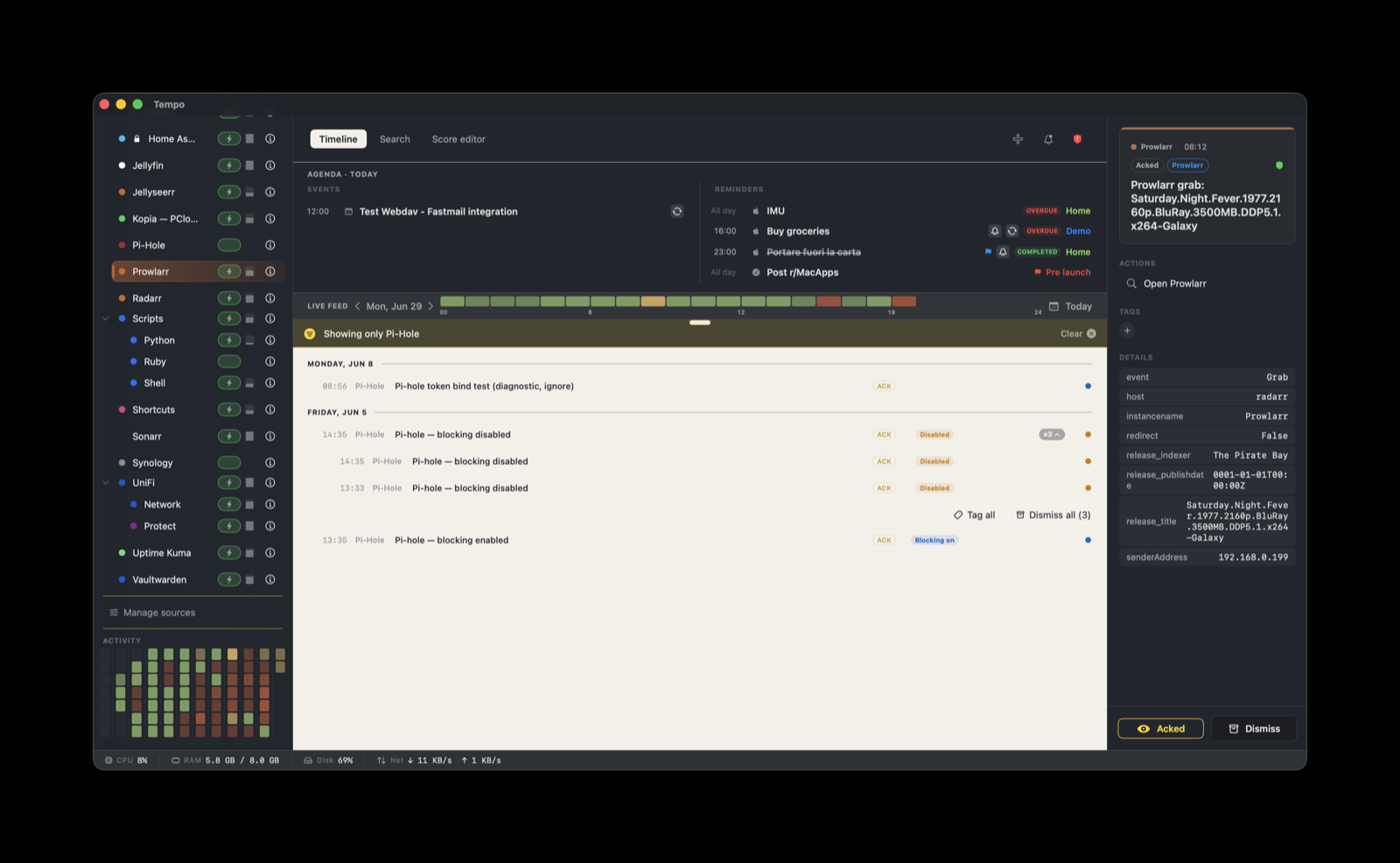
This score ships built-in and shares one helper kit with Sonarr and Radarr (the *arr integration), because all three wire to Tempo the same way.
How it works
Prowlarr posts events to Tempo through a Custom Script connection. There is no long-lived daemon and no relay. Prowlarr runs a small POSIX sh script (tempo-notify.sh) once per notification, inside the Prowlarr container or host, and that script POSTs a Tempo-shaped event to your Mac.
Prowlarr  (raises a notification: health issue, recovery, update)
      |  runs the Custom Script once
tempo-notify.sh  (builds a Tempo event, reads the token)
      |  HTTPS POST
Tempo ingestion server  on <mac-ip>:8776  (TLS) or :7776 (plain)
The script carries only data (a title plus metadata). The score owns the presentation: color, severity, and the action. Because Tempo honors a sender-provided severity when one is present, the score’s severity rules apply when the script leaves severity to Tempo.
Setup
1. Create the token
In Tempo, open Settings → Tokens and create a token bound to com.prowlarr. A token bound to a provider only accepts events that declare that provider, so leaking one app’s token cannot spoof your other sources. If you post over TLS (recommended), mark the token secure so Tempo rejects the same token over plain HTTP.
2. Get the script
The *arr scores (Sonarr, Radarr, Prowlarr) share a single helper kit rather than a per-provider kit. Because of that, the Score Editor’s Source tab shows no “Open in Finder” or “Get the helper” button for Prowlarr. Download the kit from the Tempo website and use tempo-notify-prowlarr.sh.
3. Install the script on the Prowlarr host
Prowlarr runs the script from its own filesystem, so the script and its secrets go into the app’s /config directory (a host bind mount for container installs):
mkdir -p /path/to/prowlarr/scripts
cp tempo-notify-prowlarr.sh /path/to/prowlarr/scripts/tempo-notify.sh
chmod +x /path/to/prowlarr/scripts/tempo-notify.sh
cp tempo-cert.pem /path/to/prowlarr/tempo-cert.pem          # only if posting over TLS
printf '%s' '<com.prowlarr token>' > /path/to/prowlarr/tempo-token
chmod 600 /path/to/prowlarr/tempo-token
Inside the container these are /config/scripts/tempo-notify.sh, /config/tempo-cert.pem, and /config/tempo-token, the paths the script expects. The script posts to https://<mac-ip>:8776/ingest over TLS. For plain HTTP, post to http://<mac-ip>:7776/ingest instead, drop the tempo-cert.pem file, and leave the token non-secure. See the *arr integration README in the kit for the full reference.
4. Register the Custom Script connection
In Prowlarr: Settings → Connect → + → Custom Script.
- Name:
Tempo - Path:
/config/scripts/tempo-notify.sh - Triggers: enable On Health Issue, On Health Restored, and On Application Update. Prowlarr has no library, so grab and import triggers do not apply.
- Test: the test should reach Tempo and the button turns green.
Tempo does not run the script for you. It lives on the Prowlarr host and fires whenever Prowlarr raises a notification.
What you’ll see
The score classifies on the event field the script sends:
| Event | Severity | Label |
|---|---|---|
HealthIssue | warning | Health issue |
HealthRestored | ok | Recovered |
| anything else (e.g. an application update) | info | Info |
A health issue lands as a warning to act on. When it clears, a HealthRestored event marks it recovered. Application updates land as plain info entries.
Actions
Every event carries one action:
- Open Prowlarr (magnifying-glass icon): opens
http://${metadata.senderAddress}:9696, resolved to the host that sent the event at click time. The port9696is Prowlarr’s default web UI port.
The score defines no grouping rules, so each event is its own timeline entry rather than being stacked by indexer or host.
Troubleshooting and limitations
- The Test button fails or times out. The Prowlarr host cannot reach Tempo. Check the Mac’s IP and port (
8776for TLS,7776for plain), and confirm Tempo’s ingestion server is running. For TLS, confirmtempo-cert.pemis present and the token is marked secure. - Events arrive but render without color or severity. The Prowlarr score is not active. Install it from Manage Sources.
- The Open Prowlarr action opens the wrong address. It uses
${metadata.senderAddress}, the address the script saw when it fired. If Prowlarr sits behind a reverse proxy on a different port or host, the default:9696link may not match your setup. curlmissing. The script runs inside the Prowlarr environment and depends oncurlbeing present (the common LinuxServer images ship it) and on/configbeing writable so you can place the secrets.- No retry or queue. If Tempo is unreachable when an event fires, that event is lost; Prowlarr does not re-fire it. For health state you still get the next transition (the next
HealthIssueorHealthRestored).