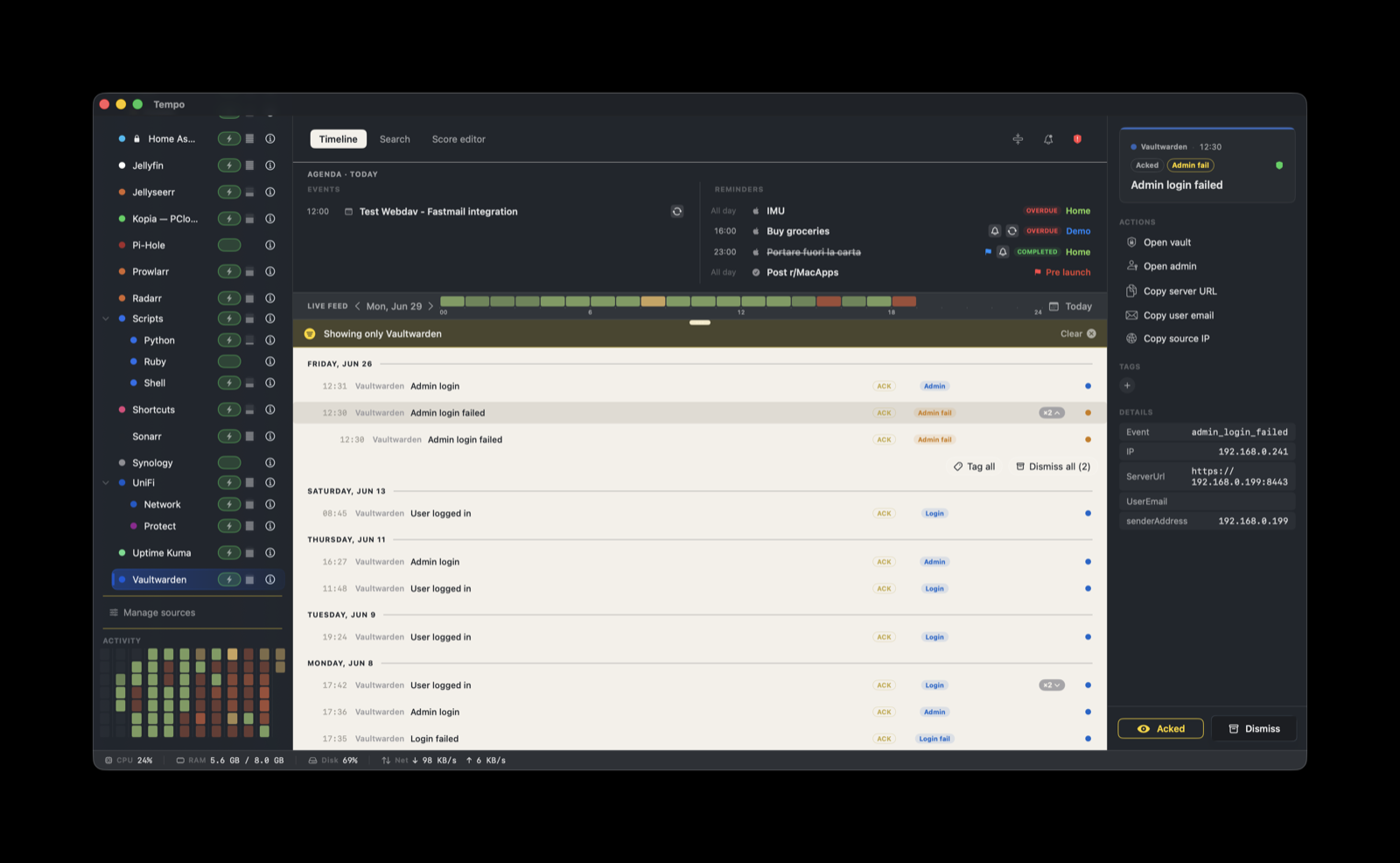
This score renders Vaultwarden authentication activity on the Tempo timeline: failed and successful logins, admin-panel access, vault exports, new users, invitations, and a brute-force burst signal, plus whether the server is reachable. It is read-only. The actions open the vault or admin in your browser and copy a few fields. Nothing writes back to Vaultwarden, and the admin token and vault data never leave the host that runs the watcher.
How it works
Vaultwarden has no native outbound webhook. Its authentication events only appear in its log, so this integration is log-driven. A small companion helper runs on the Vaultwarden host, tails the container log, and POSTs a structured event to Tempo on each auth-relevant line.
Vaultwarden container  (logs auth lines to stdout)
      |  docker logs -f
helper (vaultwarden-tempo.sh)  on the container host
      |   parses the line, extracts source IP and user email
      |   also polls  ${VW_URL}/alive  for reachability
      |  HTTP POST, per-provider token
Tempo ingestion server  on <mac>:7776/ingest
The helper does two things. It tails docker logs for authentication lines and emits an event per line (with the source IP and UserEmail). Separately, it polls Vaultwarden’s /alive endpoint on an interval, so a stopped or unreachable container is reported as down (the log tail alone cannot see “down”). The score handles what happens after an event lands: severity, the badge label, grouping, and the action buttons.
The helper holds no Vaultwarden credential. It never reads the admin token. It only tails docker logs, and its single secret is the Tempo ingestion token.
Setup
1. Create the Tempo token
In Tempo, open Settings → Ingestion and create a token bound to com.vaultwarden. Copy its value; you will put it in the helper’s configuration below.
2. Enable the score
In Tempo, open Manage Sources and enable Vaultwarden. The score ships built-in (seeded into ~/Library/Application Support/Tempo/Scores/ on first launch), so there is nothing to download. Only the generic Scripts source auto-installs; this one is activated here.
3. Get the helper
In the score’s Source tab (Score Editor), the Helper section has two buttons:
- Open in Finder copies the helper package to
~/Library/Application Support/Tempo/Integrations/com.vaultwarden/and reveals it. - Open README displays the helper’s own README.
The package contains vaultwarden-tempo.sh (the watcher) and vaultwarden-run.sh (a wrapper for the keepalive cron). Copy that folder to the host running the Vaultwarden container. The helper is a shell script and runs on any Linux or macOS host that has docker and curl.
4. Configure it
Create a vaultwarden.env file next to the scripts (chmod 600):
# vaultwarden.env  (chmod 600)
export VW_URL=https://<vaultwarden-host>:8443
export TEMPO_URL=http://<mac-ip>:7776/ingest
export VW_CONTAINER=vaultwarden
export STATE_DIR=$HOME/.local/state/vaultwarden-tempo

# Tempo token read from its own chmod 600 file, not stored in this env file:
export TEMPO_TOKEN_FILE=$STATE_DIR/tempo-tokenVW_URL: the Vaultwarden base URL. It powers the open-vault and open-admin actions, and it is the host the/aliveliveness poll checks.TEMPO_URL: your Tempo ingestion endpoint,http://<mac-running-tempo>:7776/ingest(use127.0.0.1only if Tempo and the helper run on the same machine).TEMPO_TOKEN_FILE: a path to achmod 600file holding the token from step 1. To keep it simple you can setTEMPO_TOKENinline instead, since the env file is alreadychmod 600(see below).VW_CONTAINER: the container name (defaultvaultwarden).
Liveness controls:
VW_EMIT_DOWN: the/alivepoll is on by default. SetVW_EMIT_DOWN=0to disable it (for example if another tool already monitors the container).VW_ALIVE_INTERVAL: poll interval in seconds (default30).
Keeping the token out of plaintext (*_FILE)
You do not have to leave the token in a plaintext .env. Every secret also resolves from a file: set TEMPO_TOKEN_FILE to a path and the helper reads the secret from there, so the value never enters the environment. Point it at a Docker secret (/run/secrets/..., mounted in tmpfs), a systemd encrypted credential (LoadCredentialEncrypted), or any chmod 600 file. Resolution order is file, then environment variable, then Keychain.
The firewall must let the Vaultwarden host reach the Mac on port 7776 (allow it in the macOS firewall or Little Snitch). You can optionally restrict the token to that host’s IP with the token’s allowlist in Settings → Ingestion.
5. Run it as a daemon
The watcher is a long-lived stream (a docker logs -f tail plus the /alive poll), not a cron one-shot. Keep it running and restart it on crash or reboot.
Linux: flock keepalive cron
This is the method the helper package ships for. vaultwarden-run.sh sources the env file and execs the watcher, logging to a file:
# vaultwarden-run.sh
#!/bin/sh
. /home/<you>/tempo-vaultwarden/vaultwarden.env
exec bash /home/<you>/tempo-vaultwarden/vaultwarden-tempo.sh >> /home/<you>/tempo-vaultwarden/vw-watcher.log 2>&1
A single-instance flock cron restarts it within 5 minutes if it dies and starts it on boot. flock holds the lock for the whole life of the stream, so a second copy never starts:
*/5 * * * * flock -n /home/<you>/tempo-vaultwarden/vaultwarden.lock /home/<you>/tempo-vaultwarden/vaultwarden-run.sh
@reboot     flock -n /home/<you>/tempo-vaultwarden/vaultwarden.lock /home/<you>/tempo-vaultwarden/vaultwarden-run.sh
Linux: systemd (alternative)
If you prefer systemd, create /etc/systemd/system/tempo-vaultwarden.service:
[Unit]
Description=Tempo Vaultwarden watcher
After=docker.service network-online.target

[Service]
EnvironmentFile=/home/<you>/tempo-vaultwarden/vaultwarden.env
ExecStart=/usr/bin/env bash /home/<you>/tempo-vaultwarden/vaultwarden-tempo.sh
Restart=always

[Install]
WantedBy=multi-user.target
Then sudo systemctl enable --now tempo-vaultwarden.
macOS: launchd
If Vaultwarden runs in Docker on a Mac, a LaunchAgent keeps the watcher alive. Create ~/Library/LaunchAgents/app.tempo.vaultwarden.plist:
<?xml version="1.0" encoding="UTF-8"?>
<!DOCTYPE plist PUBLIC "-//Apple//DTD PLIST 1.0//EN" "http://www.apple.com/DTDs/PropertyList-1.0.dtd">
<plist version="1.0">
<dict>
  <key>Label</key><string>app.tempo.vaultwarden</string>
  <key>ProgramArguments</key>
  <array>
    <string>/bin/sh</string>
    <string>/Users/<you>/tempo-vaultwarden/vaultwarden-run.sh</string>
  </array>
  <key>RunAtLoad</key><true/>
  <key>KeepAlive</key><true/>
</dict>
</plist>
Load it with launchctl bootstrap gui/$(id -u) ~/Library/LaunchAgents/app.tempo.vaultwarden.plist.
Windows
Run Vaultwarden’s watcher on the container host. If that host is Windows, run the script under WSL or Git Bash (it needs a POSIX shell, docker, and curl) and keep it alive with a Scheduled Task that runs at logon and restarts on failure, or a service wrapper such as NSSM. In practice the Vaultwarden host is usually Linux, so the flock or systemd method above is the common path.
What you’ll see
Events arrive as alerts with a badge label and a severity. The severity drives whether Tempo rings its needs-attention bell (warning and critical) or stays quiet in the timeline (info).
| Event / status | Badge | Severity | When |
|---|---|---|---|
Status: down | Down | critical | the /alive poll fails (server stopped) |
Status: unreachable | Unreachable | critical | the /alive poll cannot reach the host |
login_failed_burst | Brute-force | warning | 5 or more failed logins within 5 minutes |
admin_login_failed | Admin fail | warning | a wrong admin token at /admin |
vault_exported | Vault export | warning | a vault was exported (a data-exfiltration signal) |
login_failed | Login fail | info | a single failed login |
user_login | Login | info | a successful login |
user_created | New user | info | a new account registered |
user_invited | Invite | info | an invitation was sent |
admin_login | Admin | info | a successful admin-panel login |
| (any other event) | Info | info | default |
The user_invited event carries no email: the recipient address is not in the Vaultwarden log unless SMTP is configured (Vaultwarden then logs the recipient).
If you want to silence a specific event type you do not care about (for example user_login), do not edit the helper. In the score’s Ack and dismiss tab (Score Editor), add a rule that auto-dismisses events matching that Event. They still land for the record but never demand attention.
Grouping and actions
Events stack within a 1 hour window, keyed on UserEmail and Event (["${metadata.UserEmail}", "${metadata.Event}"]). Repeated activity of the same kind by the same account collapses into one entry rather than a row per line. A burst of failed logins for one account therefore reads as a single stack.
Five actions are attached to every event:
- Open vault: opens
${metadata.ServerUrl}/. - Open admin: opens
${metadata.ServerUrl}/admin/. - Copy server URL: copies
${metadata.ServerUrl}. - Copy user email: copies
${metadata.UserEmail}. - Copy source IP: copies
${metadata.IP}.
Actions whose template field is empty for a given event (for example Copy user email on an event with no email) resolve to nothing useful, since the helper sends an empty string for fields it cannot extract.
Metadata fields
The helper sends these keys, and the score reads them:
Event: drives severity and the badge label (values above).Status:downorunreachable, set by the/aliveliveness poll.ServerUrl: the Vaultwarden base URL, used by the open-vault, open-admin, and copy-server-URL actions.UserEmail: the account involved, when present. Part of the grouping key.IP: the source IP of the authentication line, copied by the copy-source-IP action.
Troubleshooting and limitations
- The helper must run on the container host. It uses
docker logs, so it has to run where the Vaultwarden container runs, not on the Mac. - Reports activity, not vault contents. The helper reads the container log, so it sees authentication events and
/alivereachability only. It cannot read vaults or secrets, and it does not block attacks: it reports a brute-force run, it does not stop it. Pair it with source-side hardening (disable open signups, use a strongADMIN_TOKEN, front it with a reverse proxy and fail2ban if it is internet-reachable). - Log wording varies by version. The
login_failed,user_login,admin_login_failed, andadmin_loginpatterns match standard Vaultwarden logs. Thevault_exportedanduser_createdwordings differ slightly between versions; confirm againstdocker logs <container>and adapt the parser branch if an event does not appear. - No events at all. Check that the token is bound to
com.vaultwarden, that the helper can reach the Mac on port 7776 (firewall), and thatVW_CONTAINERmatches the running container name. - No down or unreachable events. Confirm
VW_EMIT_DOWNis not set to0and thatVW_URLis reachable from the helper host. - Bare-metal Vaultwarden. If Vaultwarden does not run in Docker, point the watcher at the log file (
tail -F /path/to/vaultwarden.log) instead ofdocker logs; the parser is the same. - Sensitive actions are deliberately absent. The catalog score uses only
openURLandcopyToClipboard. Kicking sessions, disabling the server, or rotating the admin token are sensitive and not included; those would need a local drop-in score you explicitly trust.